GAS项目笔记3
Nov 20, 2025
47 mins read
整体流程图
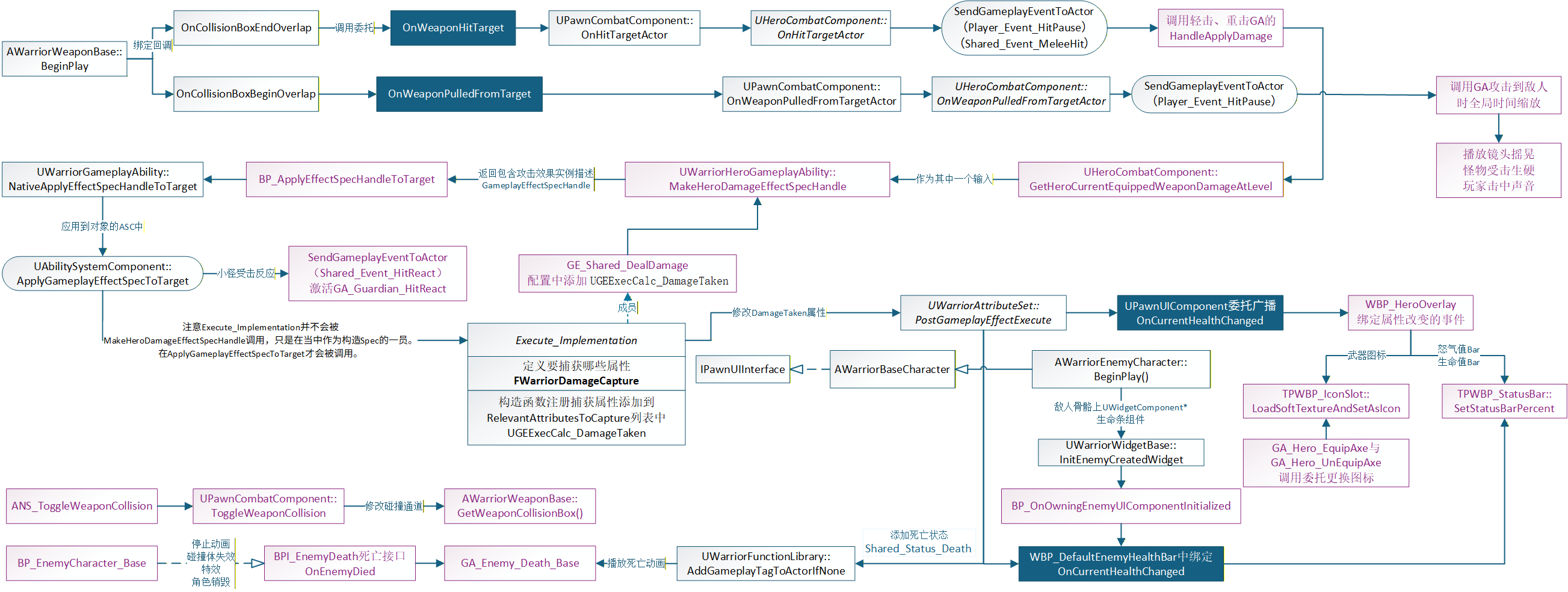
武器的beginplay中绑定自定义回调函数到OnComponentBeginOverlap、OnComponentEndOverlap的委托,也就是当overlap时会触发自定义的回调函数,然后在该函数中传递击中的角色调用了绑定OnWeaponHitTarget委托的回调函数(在扩展组件的PawnCombatComponent中武器注册的时候绑定的),因此会调用HeroCombatComponent(子类),其中会将碰撞到的物体都存入一个数组中,然后SendGameplayEventToActor,这样在GA中通过waitgameplayevent可以处理接收到event后的伤害逻辑——》HandleApplyDamage,在其中调用MakeHeroDamageEffectSpecHandle(自定义生成一个处理角色伤害GE的Spec Handle)传入到NativeApplyEffectSpecHandleToTarget
怪物生成武器
创建新的cpp文件:
- UEnemyCombatComponent : public UPawnCombatComponent
- UWarriorEnemyGameplayAbility : public UWarriorGameplayAbility
- AWarriorEnemyCharacter : public AWarriorBaseCharacter
- UDataAsset_EnemyStartUpData : public UDataAsset_StartUpDataBase
并在编辑器中创建:
ABP_Enemy_Base
|__ABP_Guardian
BS_Guardian_Default
BP_EnemyCharacter_Base
|__BP_Gruntling_Base
|__BP_Gruntling_Guardian
在AWarriorEnemyCharacter中创建一个EnemyCombatComponent组件,设置怪物角色的基础属性。
在UWarriorEnemyGameplayAbility中和UWarriorHeroGameplayAbility一样,需要创建如下函数,暴露给蓝图,用于获取怪物角色和怪物的Combat组件。
UFUNCTION(BlueprintPure, Category = "Warrior|Ability")
AWarriorEnemyCharacter* GetEnemyCharacterFromActorInfo();
UFUNCTION(BlueprintPure, Category = "Warrior|Ability")
UEnemyCombatComponent* GetEnemyCombatComponentFromActorInfo();
private:
TWeakObjectPtr<AWarriorEnemyCharacter> CachedWarriorEnemyCharacter;
在UDataAsset_EnemyStartUpData中重写父类的GiveToAbilitySystemComponent。该函数会在怪物角色的PossessedBy中调用。
void UDataAsset_EnemyStartUpData::GiveToAbilitySystemComponent(UWarriorAbilitySystemComponent* InASCToGive,
    int32 ApplyLevel)
{
    Super::GiveToAbilitySystemComponent(InASCToGive, ApplyLevel);
    if (!EnemyCombatAbilities.IsEmpty())
    {
       for (const TSubclassOf<UWarriorEnemyGameplayAbility>& AbilityClass : EnemyCombatAbilities)
       {
          if (!AbilityClass) continue;
          FGameplayAbilitySpec AbilitySpec(AbilityClass);
          AbilitySpec.SourceObject = InASCToGive->GetAvatarActor();
          AbilitySpec.Level = ApplyLevel;
          InASCToGive->GiveAbility(AbilitySpec);
       }
    }
}
因为玩家只有一个,所以同步加载也无所谓,但是怪物有很多个,所以我们要使用异步加载。
创建Lambda表达式,在其中调用UDataAsset_EnemyStartUpData的GiveToAbilitySystemComponent。
void AWarriorEnemyCharacter::PossessedBy(AController* NewController)
{
	Super::PossessedBy(NewController);
	InitEnemyStartUpData();
}

void AWarriorEnemyCharacter::InitEnemyStartUpData()
{
	if (CharacterStartUpData.IsNull())
	{
		return;
	}
	UAssetManager::GetStreamableManager().RequestAsyncLoad(
		CharacterStartUpData.ToSoftObjectPath(),
		FStreamableDelegate::CreateLambda(
			[this]()
			{
				if (UDataAsset_StartUpDataBase* LoadedData = CharacterStartUpData.Get())
				{
					LoadedData->GiveToAbilitySystemComponent(WarriorAbilitySystemComponent);
				}
			})
	);
}
添加新的GameplayTag_Enemy_Weapon,用于怪物出生时生成武器。
创建新的GA_Gruntling_SpawnWeapon继承GA_SpawnWeaponBase。在其中配置好参数,并且在DA_Guardian(继承UDataAsset_EnemyStartUpData )中配置该GA。即可实现怪物出生即生成武器。
创建属性
创建6个属性分别是:CurrentHealth、MaxHealth、CurrentRage、MaxRage、AttackPower、DefensePower
并在构造函数中初始化它。
// AttributeSet 类里专门用来管理 Gameplay 属性(Attribute)的宏级封装工具
// 自动为某个 FGameplayAttributeData 属性生成访问、修改、初始化等接口
#define ATTRIBUTE_ACCESSORS(ClassName, PropertyName) \
GAMEPLAYATTRIBUTE_PROPERTY_GETTER(ClassName, PropertyName) \
GAMEPLAYATTRIBUTE_VALUE_GETTER(PropertyName) \
GAMEPLAYATTRIBUTE_VALUE_SETTER(PropertyName) \
GAMEPLAYATTRIBUTE_VALUE_INITTER(PropertyName)

UPROPERTY(BlueprintReadOnly, Category = "Health")
FGameplayAttributeData CurrentHealth;
ATTRIBUTE_ACCESSORS(UWarriorAttributeSet, CurrentHealth)

UWarriorAttributeSet::UWarriorAttributeSet()
{
	InitCurrentHealth(1.f);
	InitMaxHealth(1.f);
	InitCurrentRage(1.f);
	InitMaxRage(1.f);
	InitAttackPower(1.f);
	InitDefensePower(1.f);
}
创建CT_HeroStats存储玩家出生时属性配置表
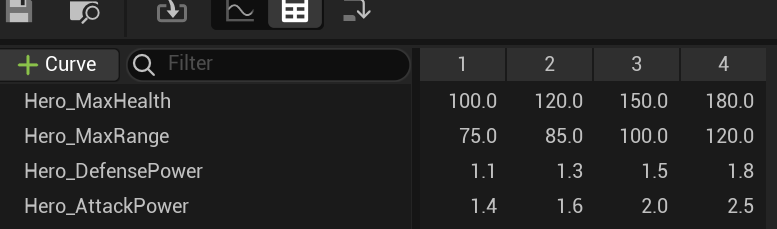
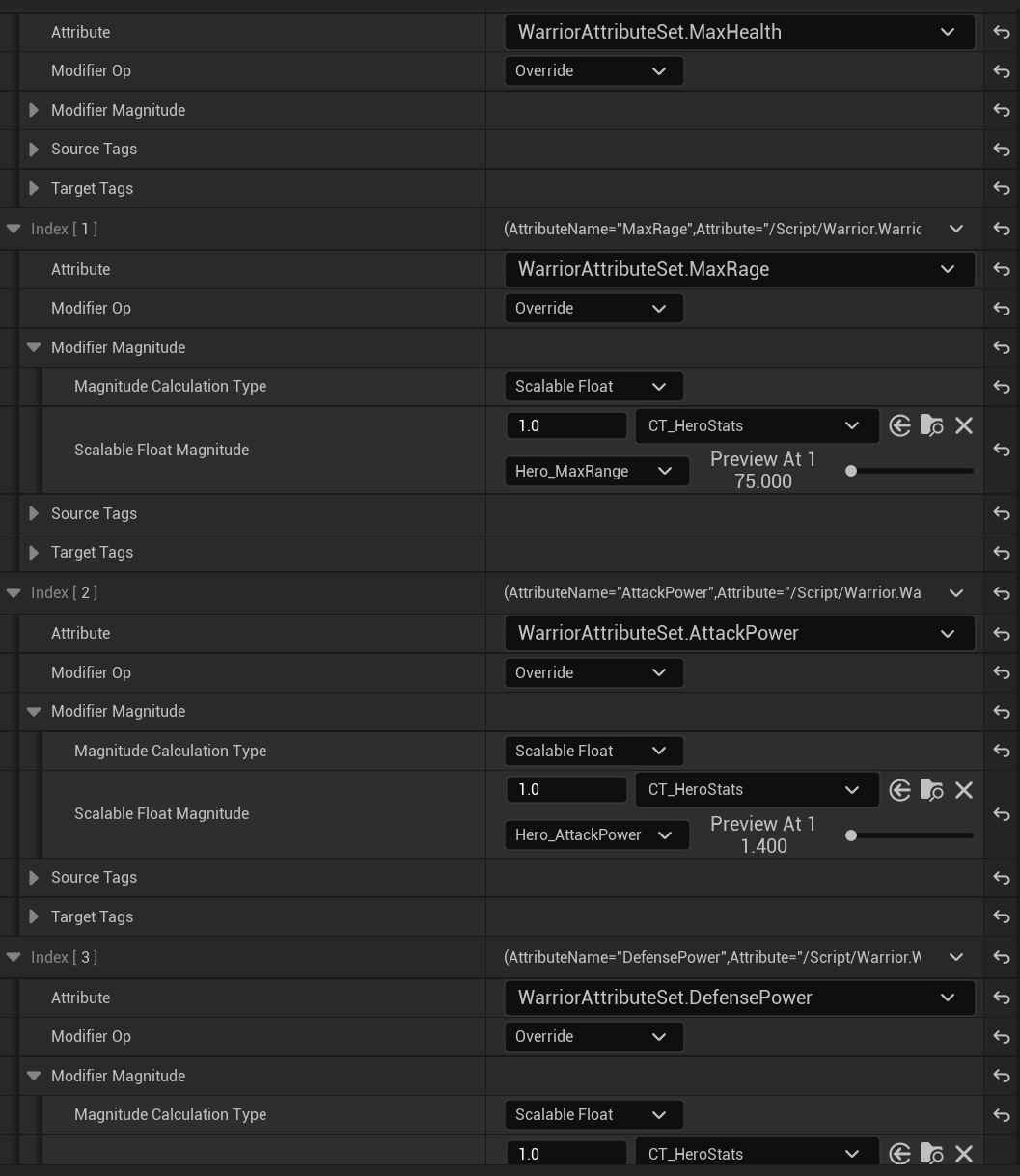
之后创建GE_HeroStartUp填写要修改的属性。这是为了让玩家初始拥有最大血量、最大怒气值、攻击力和防御力。
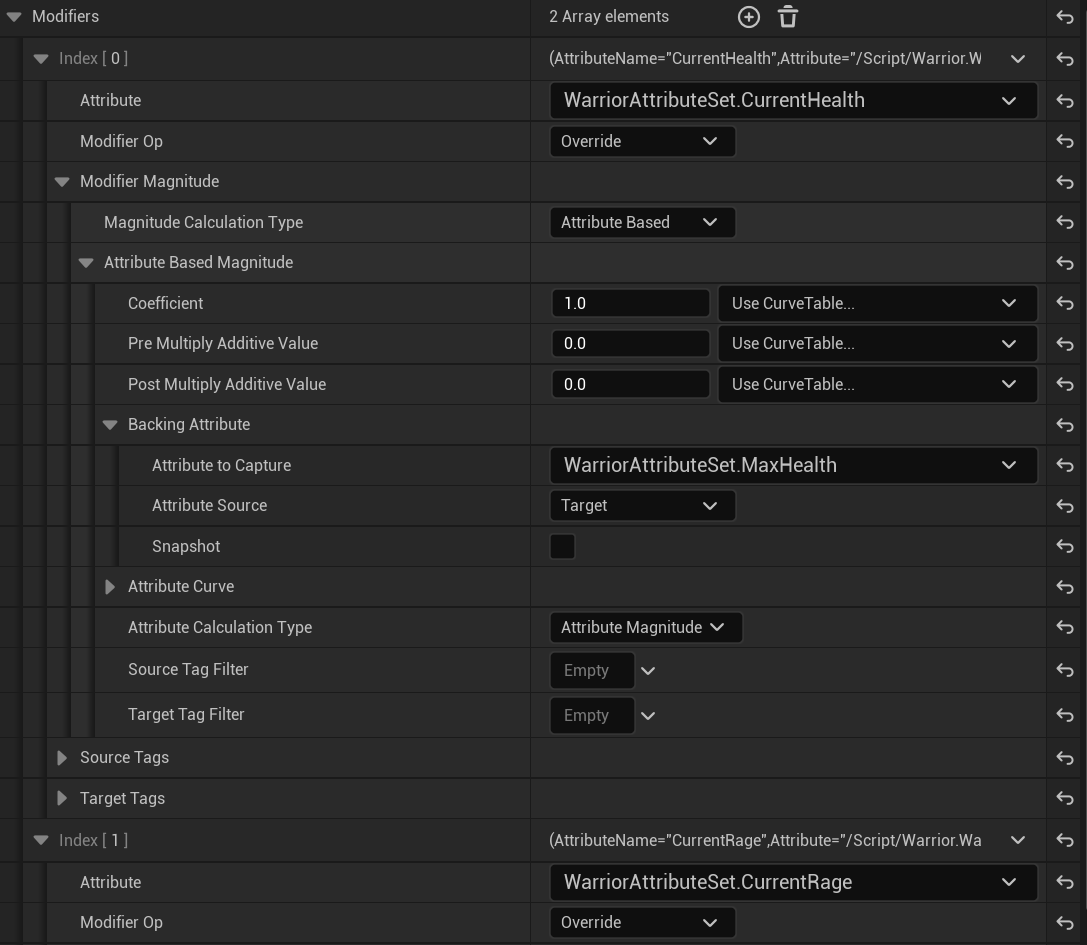
之后创建一个同样用作初始化玩家属性的GE_Hero_Static,设置Magnitude Calculation Type为Attribute Based,该类型是基于某个属性去做修改。
我们要在这里修改当前生命值和当前怒气值。所以Attribute To Capture设置为最大生命值和最大怒气值。
将AttributeSource设为Target。
之后再UDataAsset_StartUpDataBase中定义一个初始化GE数组,用于初始化施加GE。
UPROPERTY(EditDefaultsOnly, Category = "StartUpData")
TArray<TSubclassOf<UGameplayEffect>> StartUpGameplayEffects;
在GiveToAbilitySystemComponent中添加如下逻辑,即可完成玩家初始化生命值等属性。
void UDataAsset_StartUpDataBase::GiveToAbilitySystemComponent(UWarriorAbilitySystemComponent* InASCToGive,
                                                              int32 ApplyLevel)
{
    check(InASCToGive);
    GrantAbilities(ActivateOnGivenAbilities, InASCToGive, ApplyLevel);
    GrantAbilities(ReactiveAbilities, InASCToGive, ApplyLevel);
    if (!StartUpGameplayEffects.IsEmpty())
    {
       for (const TSubclassOf<UGameplayEffect>& EffectClass : StartUpGameplayEffects)
       {
          if (!EffectClass) continue;
          UGameplayEffect* EffectCDO = EffectClass->GetDefaultObject<UGameplayEffect>();
          InASCToGive->ApplyGameplayEffectToSelf(
             EffectCDO,
             ApplyLevel,
             InASCToGive->MakeEffectContext()
             );
       }
    }
}
怪物属性与GE
与角色同理,但是怪物的GE没有怒气值。创建一个新的CurveTable配置好怪物的属性。并且在怪物的DA中也配置好初始的GE。
为了在调试中可以看到怪物属性,将项目文件夹中Config的DefaultGame.ini进行修改。
[/Script/GameplayAbilities.AbilitySystemGlobals]
bUseDebugTargetFromHud = true
武器碰撞检测
武器不能一直开着碰撞,应该在动画中添加通知ANS_ToggleWeaponCollision,使得其在动画播放到合适的时候禁用、开启武器碰撞。
但是多个角色发起很多次攻击,就要获取很多次武器(通过PawnCombatComponent获取武器),这样多次查找很浪费性能。
因此我们需要创建一个接口UPawnCombatInterface,当中只有一个获取PawnCombatComponent的纯虚函数不做实现,然后让AWarriorBaseCharacter添加这个接口,重新该函数返回nullptr。
而子类AWarriorEnemyCharacter和AWarriorHeroCharacter返回其Combat组件。
virtual UPawnCombatComponent* GetPawnCombatComponent() const = 0;
// ~ Begin IPawnCombatInterface Interface
virtual UPawnCombatComponent* GetPawnCombatComponent() const override;
// ~ End IPawnCombatInterface Interface
为了在蓝图中可以获取到,新增两个函数:
static UPawnCombatComponent* NativeGetPawnCombatComponentFromActor(AActor* InActor);

UFUNCTION(BlueprintCallable, Category = "Warrior|FunctionLibrary", meta = (DisplayName = "GetPawnCombatComponentFromActor", ExpandEnumAsExecs = "OutValidType"))
static UPawnCombatComponent* BP_GetPawnCombatComponentFromActor(AActor* InActor, EWarriorValidType& OutValidType);

UPawnCombatComponent* UWarriorFunctionLibrary::NativeGetPawnCombatComponentFromActor(AActor* InActor)
{
	check(InActor);
	if (IPawnCombatInterface* PawnCombatInterface = Cast<IPawnCombatInterface>(InActor))
	{
		return PawnCombatInterface->GetPawnCombatComponent();
	}
	return nullptr;
}
UPawnCombatComponent* UWarriorFunctionLibrary::BP_GetPawnCombatComponentFromActor(AActor* InActor,
	EWarriorValidType& OutValidType)
{
	UPawnCombatComponent* CombatComponent = NativeGetPawnCombatComponentFromActor(InActor);
	OutValidType = CombatComponent? EWarriorValidType::Valid : EWarriorValidType::Invalid;
	return CombatComponent;
}
在PawnCombatComponent中添加一个ToggleWeaponCollision函数,用于根据布尔值启用 / 禁用武器的碰撞体,会在ANS_ToggleWeaponCollision调用。
void UPawnCombatComponent::ToggleWeaponCollision(bool bShouldEnable, EToggleDamageType ToggleDamageType)
{
    if (ToggleDamageType == EToggleDamageType::CurrentEquippedWeapon)
    {
       AWarriorWeaponBase* WeaponToToggle = GetCharacterCurrentEquippedWeapon();
       check(WeaponToToggle);
       if (bShouldEnable)
       {
          WeaponToToggle->GetWeaponCollisionBox()->SetCollisionEnabled(ECollisionEnabled::QueryOnly);
       }
       else
       {
          WeaponToToggle->GetWeaponCollisionBox()->SetCollisionEnabled(ECollisionEnabled::NoCollision);
       }
    }
}
之后将ANS_ToggleWeaponCollision添加到动画中。
在WarriorWeaponBase的BeginPlay中绑定BeginOverlap和EndOverlap函数。
OnComponentBeginOverlap和OnComponentEndOverlap是一个动态多播委托,使用AddUniqueDynamic可以防止重复绑定。
void AWarriorWeaponBase::BeginPlay()
{
    Super::BeginPlay();
    WeaponCollisionBox->OnComponentBeginOverlap.AddUniqueDynamic(this, &ThisClass::OnCollisionBoxBeginOverlap);
    WeaponCollisionBox->OnComponentEndOverlap.AddUniqueDynamic(this, &ThisClass::OnCollisionBoxEndOverlap);
}
为什么不能在构造函数中绑定?
当构造函数执行时候C++正在构建CDO,这个时候对象只是“模板”,还未注册到世界中,蓝图在生成派生类时,会复制CDO中的属性结构,然后自己再重新生成实例。因此绑定会丢失。
定义两个委托用来监听武器击中和离开敌人的事件。并在beginoverlap和endoverlap中进行执行。
DECLARE_DELEGATE_OneParam(FOnTargetInteractedDelegate, AActor*);
FOnTargetInteractedDelegate OnWeaponHitTarget;
FOnTargetInteractedDelegate OnWeaponPulledFromTarget;
void AWarriorWeaponBase::OnCollisionBoxBeginOverlap(UPrimitiveComponent* OverlappedComponent, AActor* OtherActor,
                                                    UPrimitiveComponent* OtherComp, int32 OtherBodyIndex, bool bFromSweep, const FHitResult& SweepResult)
{
	APawn* WeaponOwningPawn = GetInstigator<APawn>();
	checkf(WeaponOwningPawn, TEXT("Forget to assign an instigator as the owning pawn of the weapon: %s"), *GetName());
	if (APawn* HitPawn = Cast<APawn>(OtherActor))
	{
		if (WeaponOwningPawn != HitPawn)
		{
			OnWeaponHitTarget.ExecuteIfBound(OtherActor);
		}
	}
}

void AWarriorWeaponBase::OnCollisionBoxEndOverlap(UPrimitiveComponent* OverlappedComponent, AActor* OtherActor,
                                                  UPrimitiveComponent* OtherComp, int32 OtherBodyIndex)
{
	APawn* WeaponOwningPawn = GetInstigator<APawn>();
	checkf(WeaponOwningPawn, TEXT("Forget to assign an instigator as the owning pawn of the weapon: %s"), *GetName());
	if (APawn* HitPawn = Cast<APawn>(OtherActor))
	{
		if (WeaponOwningPawn != HitPawn)
		{
			OnWeaponPulledFromTarget.ExecuteIfBound(OtherActor);
		}
	}
}
在UPawnCombatComponent::RegisterSpawnedWeapon中进行绑定委托关联的函数OnHitTargetActor、OnWeaponPulledFromTargetActor。
InWeaponToRegister->OnWeaponHitTarget.BindUObject(this, &ThisClass::OnHitTargetActor);
InWeaponToRegister->OnWeaponPulledFromTarget.BindUObject(this, &ThisClass::OnWeaponPulledFromTargetActor);
这两个函数在其子类UHeroCombatComponent要做重写。需要重新定义一个WarriorGameplayTags::Shared_Event_MeleeHit,也就是该函数会在攻击到敌人时会发送一个GameplayEvent给自己。在GA中可以接收这个event执行逻辑。目的是为了在接收之后处理应用伤害(调用HandleAppyDamage)。
void UHeroCombatComponent::OnHitTargetActor(AActor* HitActor)
{
    if (OverlappedActors.Contains(HitActor))
    {
       return;
    }
    OverlappedActors.AddUnique(HitActor);
    FGameplayEventData Data;
    Data.Instigator = GetOwningPawn();
    Data.Target = HitActor;
    UAbilitySystemBlueprintLibrary::SendGameplayEventToActor(
       GetOwningPawn(),
       WarriorGameplayTags::Shared_Event_MeleeHit,
       Data
       );
}
委托底层原理
委托是一种观察者模式,也叫做代理,用于降低不同对象之间的耦合度。
监听者将需要响应的函数绑定到委托对象上,当事件触发时,委托会自动调用这些已绑定的函数,实现通知与回调。
原理:在委托类内部保存了一个函数指针,等需要执行时把参数传给它,然后调用它。
应用伤害
应用伤害流程
GA—— Make Gameplay Effect Spec Handle —— Apply Handle To Target —— Gameplay Effect Execution Calculation —— Attribute Set —— Notify UI
在WarriorHeroGameplayAbility中定义一个新的函数用于把一次攻击的上下文信息——(是谁打的、什么攻击、伤害多少)打包成一个 GameplayEffectSpec,供 GAS 系统分发处理。
创建一个新的tag——Shared_SetByCaller_BaseDamage
// EffectClass要生成的GE(比如GA_Damage) InWeaponBaseDamage伤害值 InCurrentAttackTypeTag攻击类型标签(比如轻击重击) InCurrentComboCount连击次数
FGameplayEffectSpecHandle UWarriorHeroGameplayAbility::MakeHeroDamageEffectSpecHandle(
    TSubclassOf<UGameplayEffect> EffectClass, float InWeaponBaseDamage, FGameplayTag InCurrentAttackTypeTag,
    int32 InCurrentComboCount)
{
    check(EffectClass);
    // ContextHandle 记录 GE的来源信息(这个能力发起的、来源对象、施加效果者)
    FGameplayEffectContextHandle ContextHandle = GetWarriorAbilitySystemComponentFromActorInfo()->MakeEffectContext();
    ContextHandle.SetAbility(this);
    ContextHandle.AddSourceObject(GetAvatarActorFromActorInfo());
    ContextHandle.AddInstigator(GetAvatarActorFromActorInfo(), GetAvatarActorFromActorInfo());
    // 创建GE EffectClass 是函数传入的 这个能力等级 刚才构建的上下文信息 ContextHandle
    FGameplayEffectSpecHandle EffectSpecHandle = GetWarriorAbilitySystemComponentFromActorInfo()->MakeOutgoingSpec(
       EffectClass,
       GetAbilityLevel(),
       ContextHandle
    );
    // 动态传入伤害数值
    EffectSpecHandle.Data->SetSetByCallerMagnitude(
       WarriorGameplayTags::Shared_SetByCaller_BaseDamage,
       InWeaponBaseDamage
    );
    // 如果攻击标签有效 则再加入参数 攻击类别(轻击重击)连击次数
    if (InCurrentAttackTypeTag.IsValid())
    {
       EffectSpecHandle.Data->SetSetByCallerMagnitude(
          InCurrentAttackTypeTag,
          InCurrentComboCount
       );
    }
    return EffectSpecHandle;
}
MakeHeroDamage其实做了装数据的事情:
FGameplayEffectSpecHandle = {
    Context:来源信息
    Level:Ability Level
    SetByCaller:基础伤害 + 轻击/重击连击参数
    EffectClass:GA_Damage
}
注意EffectClass中的Execute_Implementation函数并不会被MakeHeroDamageEffectSpecHandle调用,只是在当中作为构造Spec的一员。在ApplyGameplayEffectSpecToTarget才会被调用。
接下来就可以在蓝图中调用该函数了,为了将输入传入这个函数,我们需要有一个1GE蓝图类、2还有一个能获取武器伤害数值的函数、3当前攻击的类别和4连击次数。
- 因此首先需要创建一个GE类,我们只需要给他配置一个计算类,这个计算类是我们创建的C++新类UGEExecCalc_DamageTaken继承自UGameplayEffectExecutionCalculation。

-
在HeroCombatComponent中添加两个函数分别是返回玩家武器和武器中配置的WeaponBaseDamage(一个Curve Table,稍后会说创建它)得到这个表中武器等级对应的伤害。
AWarriorHeroWeapon* UHeroCombatComponent::GetHeroCurrentEquippedWeapon() const
{
    return Cast<AWarriorHeroWeapon>(GetCharacterCurrentEquippedWeapon());
}
float UHeroCombatComponent::GetHeroCurrentEquippedWeaponDamageAtLevel(float InLevel) const
{
    return GetHeroCurrentEquippedWeapon()->HeroWeaponData.WeaponBaseDamage.GetValueAtLevel(InLevel);
}
在WarriorStructTypes中的FWarriorHeroWeaponData中添加新成员,是一个Curve Table用于配置武器对应等级能造成的伤害。
UPROPERTY(EditDefaultsOnly, BlueprintReadOnly)
FScalableFloat WeaponBaseDamage;
之后在编辑器中创建CT_HeroWeaponStats并在武器类中配置这个表。
之后在WarriorGameplayAbility中创建两个函数,它们都是用来施加GE到目标的,但是分别用于C++和蓝图。
需要添加一个新的enum结构EWarriorSuccessType在WarriorEnumTypes中。
FActiveGameplayEffectHandle NativeApplyEffectSpecHandleToTarget(AActor* TargetActor, const FGameplayEffectSpecHandle& InSpecHandle);

UFUNCTION(BlueprintCallable, Category = "Warrior|Ability", meta = (DisplayName = "Apply Gameplay Effect Spec Handle To Target Actor", ExpandEnumAsExecs = "OutSuccessType"))
FActiveGameplayEffectHandle BP_ApplyEffectSpecHandleToTarget(AActor* TargetActor, const FGameplayEffectSpecHandle& InSpecHandle, EWarriorSuccessType& OutSuccessType);

FActiveGameplayEffectHandle UWarriorGameplayAbility::NativeApplyEffectSpecHandleToTarget(AActor* TargetActor,
	const FGameplayEffectSpecHandle& InSpecHandle)
{
	UAbilitySystemComponent* TargetASC = UAbilitySystemBlueprintLibrary::GetAbilitySystemComponent(TargetActor);
	check(TargetASC && InSpecHandle.IsValid());
	return GetWarriorAbilitySystemComponentFromActorInfo()->ApplyGameplayEffectSpecToTarget(
		*InSpecHandle.Data,
		TargetASC
	);
}

FActiveGameplayEffectHandle UWarriorGameplayAbility::BP_ApplyEffectSpecHandleToTarget(AActor* TargetActor,
	const FGameplayEffectSpecHandle& InSpecHandle, EWarriorSuccessType& OutSuccessType)
{
	FActiveGameplayEffectHandle ActiveGameplayEffectHandle = NativeApplyEffectSpecHandleToTarget(TargetActor, InSpecHandle);
	OutSuccessType = ActiveGameplayEffectHandle.WasSuccessfullyApplied() ? EWarriorSuccessType::Successful : EWarriorSuccessType::Failed;
	return ActiveGameplayEffectHandle;
}
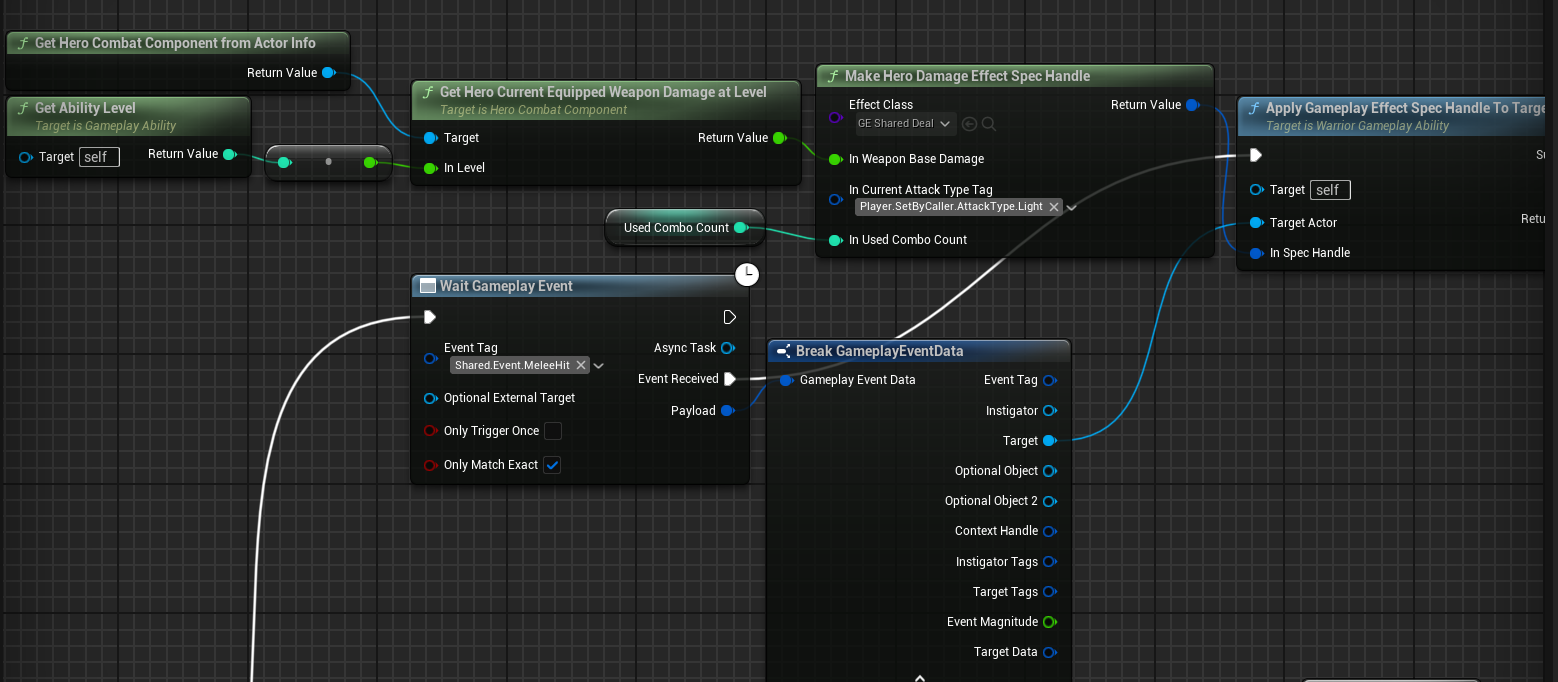
值得注意的是UsedComboCount这个变量是CurrentLightAttackComboCount提升的新变量,目的是为了在sequence先执行伤害施加时不要立马连击次数++了,所以要延迟一下变量的更新。
接下来我们需要去处理伤害数值的计算,这个伤害是融合了连击次数、武器基础伤害(武器等级)、攻击类型以及角色的攻击力。
首先在伤害计算类里,注册并声明要从 AttributeSet 中读取的属性。这里有两种方法读取属性。
-
宏
DECLARE_ATTRIBUTE_CAPTUREDEF版struct FWarriorDamageCapture { DECLARE_ATTRIBUTE_CAPTUREDEF(AttackPower) DECLARE_ATTRIBUTE_CAPTUREDEF(DefensePower) FWarriorDamageCapture() { // 从施加者的UWarriorAttributeSet获取AttackPower,每次都取最新值(false) DEFINE_ATTRIBUTE_CAPTUREDEF(UWarriorAttributeSet, AttackPower, Source, false) DEFINE_ATTRIBUTE_CAPTUREDEF(UWarriorAttributeSet, DefensePower, Target, false) } }; // 为了RelevantAttributesToCapture能够全局访问这个定义 做了一个单例静态实例 static const FWarriorDamageCapture& GetWarriorDamageCapture() { static FWarriorDamageCapture WarriorDamageCapture; return WarriorDamageCapture; } UGEExecCalc_DamageTaken::UGEExecCalc_DamageTaken() { RelevantAttributesToCapture.Add(GetWarriorDamageCapture().AttackPowerDef); RelevantAttributesToCapture.Add(GetWarriorDamageCapture().DefensePowerDef); }这个宏是GameplayAbilities 提供的简化封装,用来自动生成:
FGameplayEffectAttributeCaptureDefinition AttackPowerDef; FGameplayEffectAttributeCaptureDefinition AttackPowerProperty; -
手动创建
FGameplayEffectAttributeCaptureDefinitionFProperty* AttackPowerProperty = FindFieldChecked<FProperty>( UWarriorAttributeSet::StaticClass(), GET_MEMBER_NAME_CHECKED(UWarriorAttributeSet, AttackPower) ); FGameplayEffectAttributeCaptureDefinition AttackPowerCaptureDefinition( AttackPowerProperty, EGameplayEffectAttributeCaptureSource::Source, false ); RelevantAttributesToCapture.Add(GetWarriorDamageCapture().AttackPowerDef);相当于上面方法的宏展开版,但是很麻烦。
接下来计算伤害:
void UGEExecCalc_DamageTaken::Execute_Implementation(const FGameplayEffectCustomExecutionParameters& ExecutionParams,
	FGameplayEffectCustomExecutionOutput& OutExecutionOutput) const
{
	// GameplayEffectSpec 就是本次伤害实例的数据包 包含来源对象、tags等数据
	const FGameplayEffectSpec& EffectSpec = ExecutionParams.GetOwningSpec();

	FAggregatorEvaluateParameters EvaluateParameters;
	// 获取来源方和目标方在GESpec创建瞬间被捕获下来的标签集合
	EvaluateParameters.SourceTags = EffectSpec.CapturedSourceTags.GetAggregatedTags();
	EvaluateParameters.TargetTags = EffectSpec.CapturedTargetTags.GetAggregatedTags();

	float SourceAttackPower = 0.f;
	// 捕获来源方的攻击力
	ExecutionParams.AttemptCalculateCapturedAttributeMagnitude(GetWarriorDamageCapture().AttackPowerDef, EvaluateParameters,SourceAttackPower);

	float BaseDamage = 0.f;
	int32 UsedLightAttackComboCount = 0;
	int32 UsedHeavyAttackComboCount = 0;
	// 读取 SetByCaller 的值,这个值已经在UWarriorHeroGameplayAbility::MakeHeroDamageEffectSpecHandle被传入了
	for (const TPair<FGameplayTag, float>& TagMagnitude : EffectSpec.SetByCallerTagMagnitudes)
	{
		if (TagMagnitude.Key.MatchesTagExact(WarriorGameplayTags::Shared_SetByCaller_BaseDamage))
		{
			BaseDamage = TagMagnitude.Value;
		}
		if (TagMagnitude.Key.MatchesTagExact(WarriorGameplayTags::Player_SetByCaller_AttackType_Light))
		{
			UsedLightAttackComboCount = TagMagnitude.Value;
		}
		if (TagMagnitude.Key.MatchesTagExact(WarriorGameplayTags::Player_SetByCaller_AttackType_Heavy))
		{
			UsedHeavyAttackComboCount = TagMagnitude.Value;
		}
	}

	float TargetDefensePower = 0.f;
	// 捕获目标方的防御力
	ExecutionParams.AttemptCalculateCapturedAttributeMagnitude(GetWarriorDamageCapture().DefensePowerDef, EvaluateParameters, TargetDefensePower);

	if (UsedLightAttackComboCount != 0)
	{
		const float DamageIncreasePercentLight = (UsedLightAttackComboCount - 1) * 0.05 + 1.f;
		BaseDamage *= DamageIncreasePercentLight;
	}
	if (UsedHeavyAttackComboCount != 0)
	{
		const float DamageIncreasePercentHeavy = UsedHeavyAttackComboCount * 0.15f + 1.f;
		BaseDamage *= DamageIncreasePercentHeavy;
	}
	const float FinalDamageDone = BaseDamage * SourceAttackPower / TargetDefensePower;
	Debug::Print(TEXT("FinalDamageDone"), FinalDamageDone);
	if (FinalDamageDone > 0.f)
	{
		OutExecutionOutput.AddOutputModifier(
			FGameplayModifierEvaluatedData(
				GetWarriorDamageCapture().DamageTakenProperty,
				EGameplayModOp::Override,
				FinalDamageDone
			)
		);
	}
}
在WarriorAttributeSet中重写PostGameplayEffectExecute,在GE执行后做一个Clamp和通过DamageTaken改变Health属性。
void UWarriorAttributeSet::PostGameplayEffectExecute(const struct FGameplayEffectModCallbackData& Data)
{
	if (!CachedPawnUIInterface.IsValid())
	{
		CachedPawnUIInterface = TWeakInterfacePtr<IPawnUIInterface>(Data.Target.GetAvatarActor());
	}
	checkf(CachedPawnUIInterface.IsValid(), TEXT("didn't implement IPawnUIInterface"));

	UPawnUIComponent* PawnUIComponent = CachedPawnUIInterface->GetPawnUIComponent();
	checkf(PawnUIComponent, TEXT("Couldn't extract a PawnUIComponent from %s"), *Data.Target.GetAvatarActor()->GetActorNameOrLabel());

	if (Data.EvaluatedData.Attribute == GetCurrentHealthAttribute())
	{
		const float NewCurrentHealth = FMath::Clamp(GetCurrentHealth(), 0.f, GetMaxHealth());
		SetCurrentHealth(NewCurrentHealth);
		PawnUIComponent->OnCurrentHealthChanged.Broadcast(GetCurrentHealth() / GetMaxHealth());
	}
	if (Data.EvaluatedData.Attribute == GetCurrentRageAttribute())
	{
		const float NewCurrentRage = FMath::Clamp(GetCurrentRage(), 0.f, GetMaxRage());
		SetCurrentRage(NewCurrentRage);
		if (UHeroUIComponent* HeroUIComponent = CachedPawnUIInterface->GetHeroUIComponent())
		{
			HeroUIComponent->OnCurrentRageChanged.Broadcast(GetCurrentRage() / GetMaxRage());
		}
	}
	if (Data.EvaluatedData.Attribute == GetDamageTakenAttribute())
	{
		const float OldHealth = GetCurrentHealth();
		const float DamageDone = GetDamageTaken();

		const float NewCurrentHealth = FMath::Clamp(OldHealth - DamageDone, 0.f, GetMaxHealth());
		SetCurrentHealth(NewCurrentHealth);
		const FString DebugString = FString::Printf(TEXT("OldHealth: %f, DamageDone:%f, NewCurrentHealth:%f"), OldHealth, DamageDone, NewCurrentHealth);
		Debug::Print(DebugString, FColor::Green);

		PawnUIComponent->OnCurrentHealthChanged.Broadcast(GetCurrentHealth() / GetMaxHealth());
		if (NewCurrentHealth == 0.f)
		{
			UWarriorFunctionLibrary::AddGameplayTagToActorIfNone(Data.Target.GetAvatarActor(), WarriorGameplayTags::Shared_Status_Death);
		}
	}
}
击中反应
目标1:敌人在受击时会面对玩家播放受击蒙太奇动画。
添加如下几个Tag。分别用于敌人近战、远程、受击的能力、触发受击的事件。并配置DA_Guardian。
WARRIOR_API UE_DECLARE_GAMEPLAY_TAG_EXTERN(Enemy_Ability_Melee);
WARRIOR_API UE_DECLARE_GAMEPLAY_TAG_EXTERN(Enemy_Ability_Ranged);

WARRIOR_API UE_DECLARE_GAMEPLAY_TAG_EXTERN(Shared_Ability_HitReact);
WARRIOR_API UE_DECLARE_GAMEPLAY_TAG_EXTERN(Shared_Event_HitReact);
将之前轻击和重击GA中处理受伤的逻辑封装成一个函数。在该函数中调用SendGameplayEventToActor函数,发送Shared.Event.HitReact给敌人。
创建一个GA_Enemy_HitReact_Base、GA_Guardian_HitReact(继承前一个)
配置好基类的Tags和Triggers,更改InstancingPolicy为InstancedPerActor。
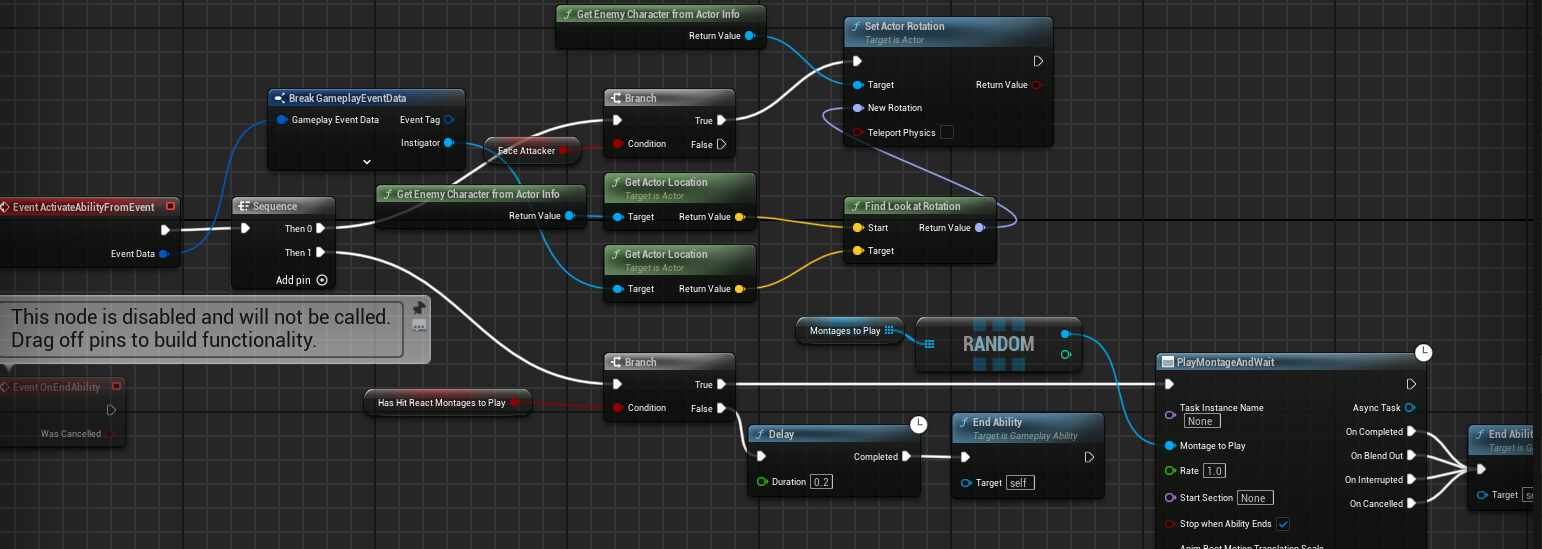
在子类受击GA中添加随机蒙太奇。
**目标2:**敌人在受击时材料颜色更改为红色。
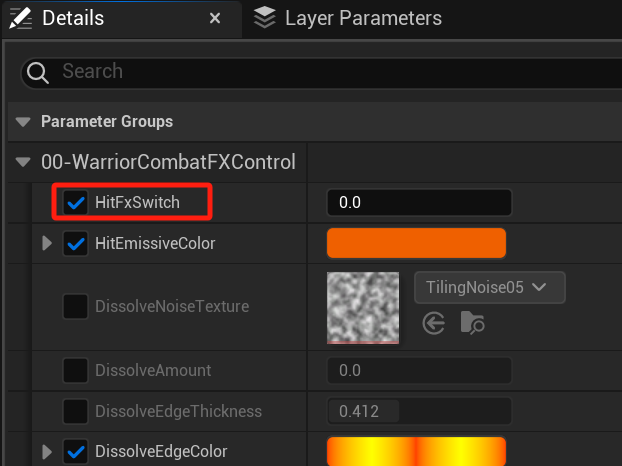
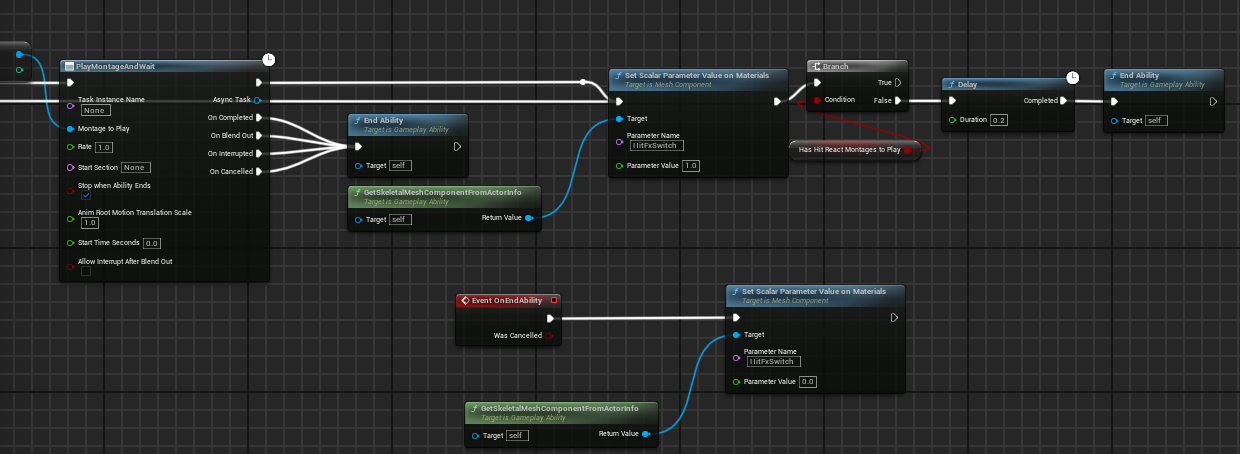
**目标3:**敌人在受击时全局缩放时间
添加新的GameplayTag——Player_Event_HitPause、Player_Ability_HitPause
在HeroCombatComponent中OnHitTargetActor函数添加一个发送Event。并在DA_Hero中配置好ReactAbility为Player_Ability_HitPause。然后创建GA_Hero_HitPause配置好那些东西。
void UHeroCombatComponent::OnHitTargetActor(AActor* HitActor)
{
    // ...
    UAbilitySystemBlueprintLibrary::SendGameplayEventToActor(
       GetOwningPawn(),
       WarriorGameplayTags::Shared_Event_MeleeHit,
       Data
    );
    UAbilitySystemBlueprintLibrary::SendGameplayEventToActor(
       GetOwningPawn(),
       WarriorGameplayTags::Player_Event_HitPause,
       FGameplayEventData()
    );
}
void UHeroCombatComponent::OnWeaponPulledFromTargetActor(AActor* InteractedActor)
{
    UAbilitySystemBlueprintLibrary::SendGameplayEventToActor(
    GetOwningPawn(),
    WarriorGameplayTags::Player_Event_HitPause,
    FGameplayEventData()
    );
}
**目标4:**击中后镜头摇晃
创建CameraShake_HeroMelee蓝图继承DefaultCameraShakeBase,按照如下配置:
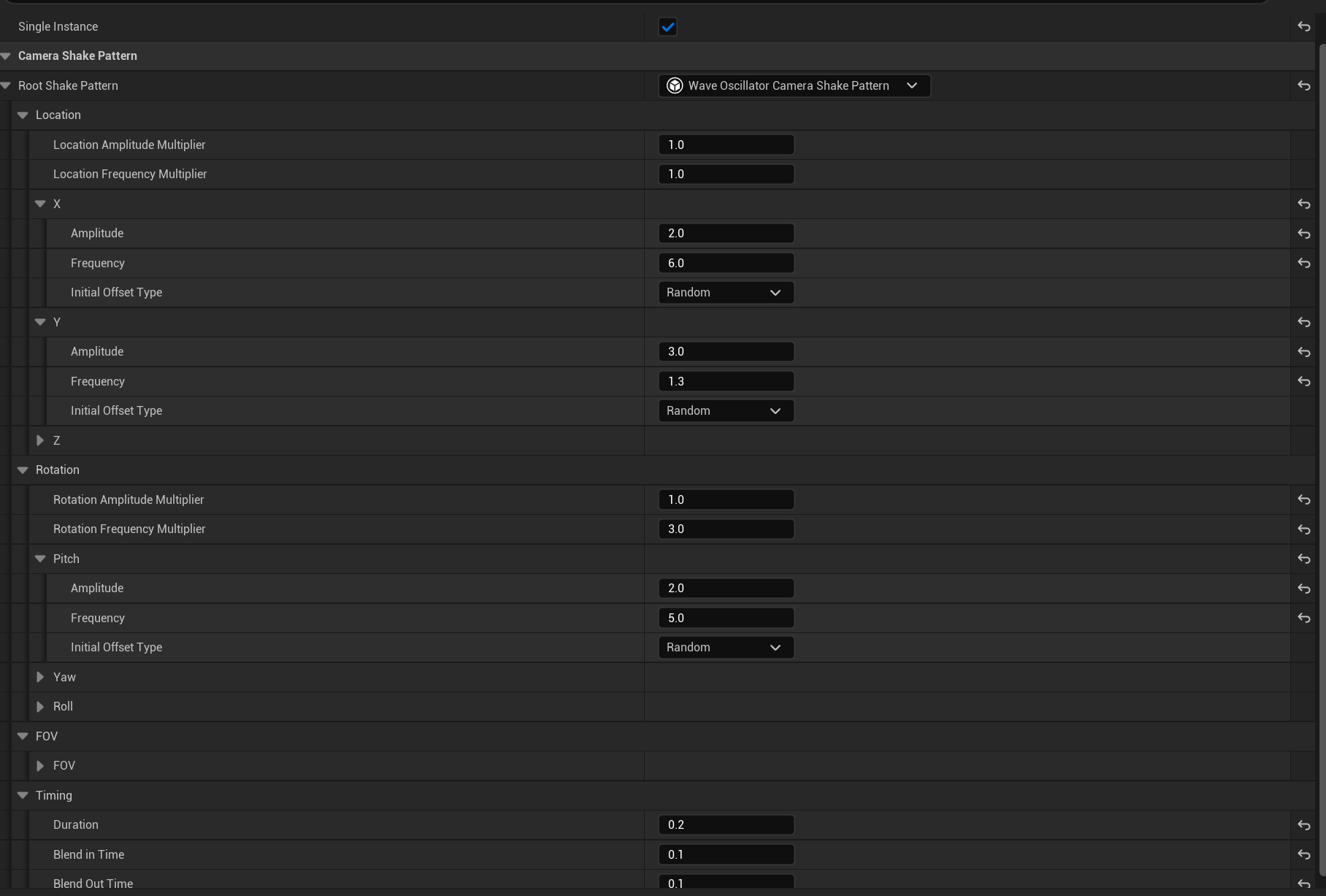
在GA_Hero_HitPause中继续连接ClientStartCameraShake函数去播放该创建好的CameraShake类。
目标5:受击怪物声音
与之前相同,在蒙太奇动画中添加Notify,但是多个怪物会发出多个声音,因此创建一个SoundConcurrency命名Concurrency_OneAtATime,目的是为了让同一个音效只播放一个,新的会覆盖旧的。并且添加到SoundCue中。
**目标5:**玩家击中声音
首先在Config文件夹中的DefaultGame.ini中添加GameplayCue的文件夹路径GameplayCueNotifyPaths = "/Game/GameplayCues"
之后在GameplayCue文件夹中创建一个继承GameplayCueNotifyStatic的蓝图,创建一个新的GameplayCueTag——(TagName="GameplayCue.Sounds.MeleeHit.Axe"),在蓝图中播放音效。
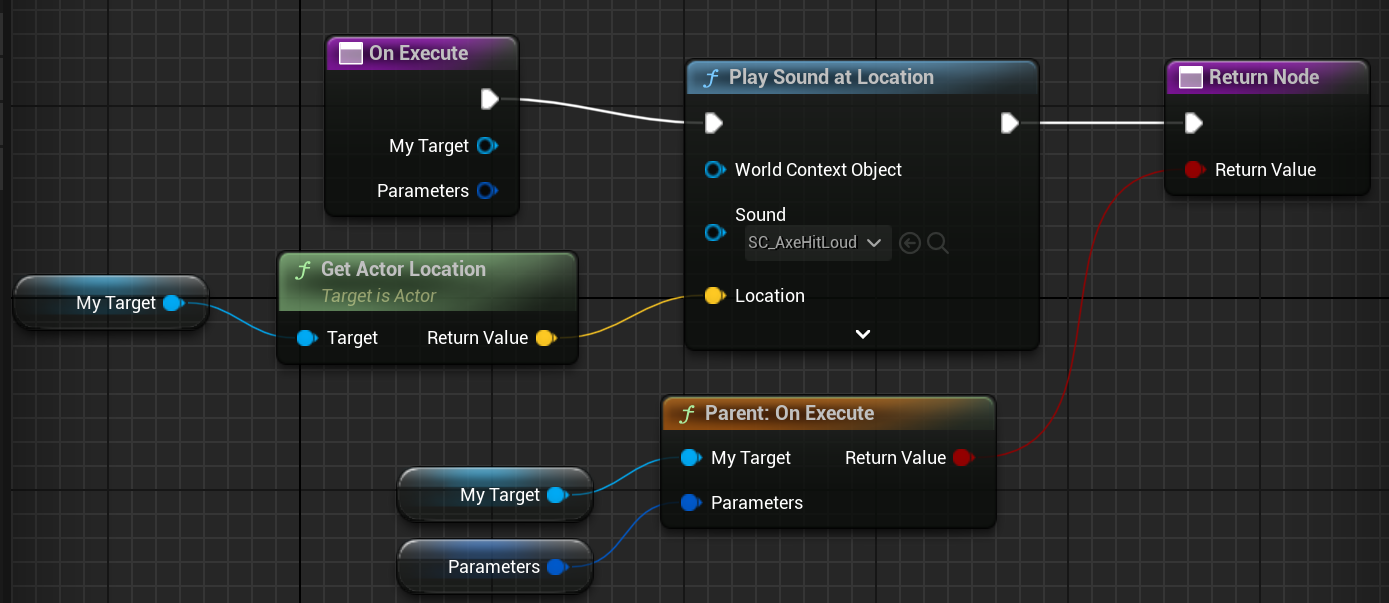
在攻击的GA中添加ExecuteGameplayCueOnOwner去执行这个Cue。
敌人死亡
生命值为0时添加Tag,然后播放蒙太奇动画。
创建两个Tag,分别是添加的死亡状态Tag——Shared_Status_Death,收到这个Tag之后会触发死亡的能力——Shared_Ability_Death。
之后在WarriorAttributeSet::PostGameplayEffectExecute中添加如下代码,它会在角色死亡时在身上添加一个死亡状态Tag。
if (NewCurrentHealth == 0.f)
{
    UWarriorFunctionLibrary::AddGameplayTagToActorIfNone(Data.Target.GetAvatarActor(), WarriorGameplayTags::Shared_Status_Death);
}
创建GA_Enemy_Death_Base,这一次不需要更改实例化方式,因为死亡不是频发发生的,所以保持默认InstancedPerExecution。
但是要注意Triggers中的TriggerSource需要更改成OwnedTagAdded,而不是之前的GameplayEvent。

之后创建GC,和击中的GC一样。创建子类GA_Guardian_Death,配置好蒙太奇动画和GCTag。
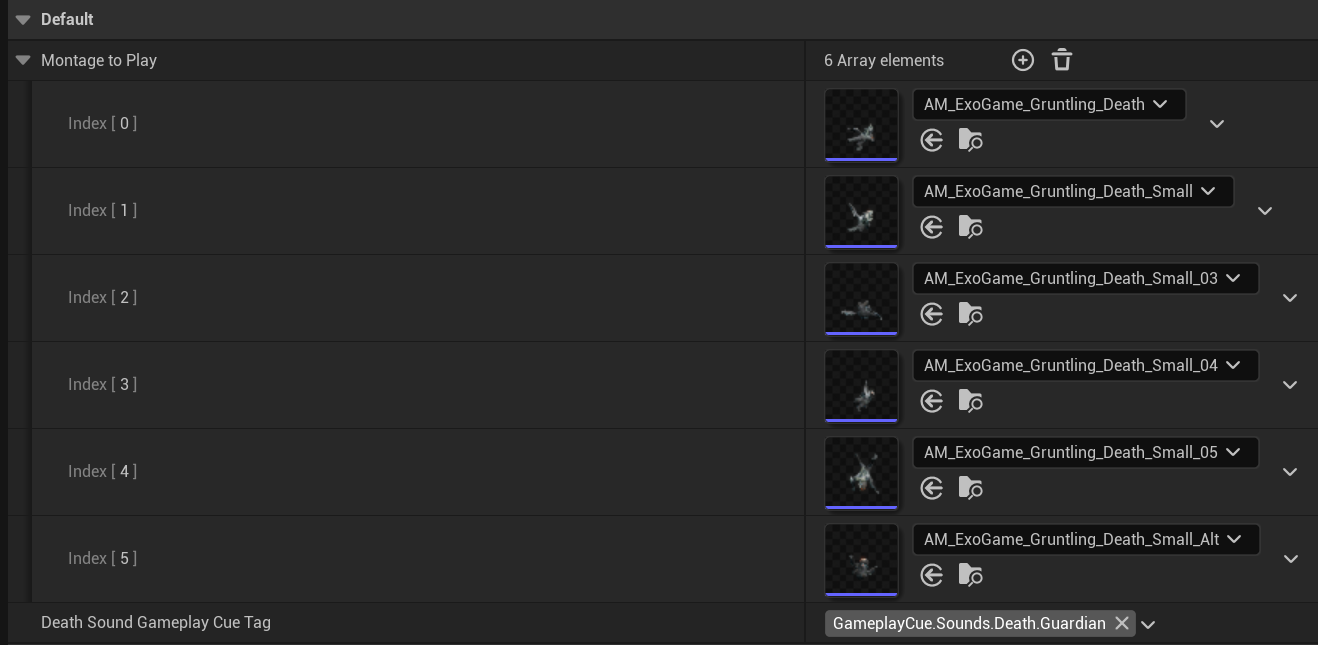
这样可以实现角色死亡后播放蒙太奇动画了。但是播放完动画角色仍然会回到之前Idle状态,这个时候需要我们去在死亡之后通知角色,1.停止动画 2.碰撞体失效 3.材质FX 4.粒子FX 5.角色销毁
创建一个蓝图接口——BPI_EnemyDeath用于敌人死亡的接口,该接口中有一个OnEnemyDied函数,在敌人类中添加该接口,并且调用该接口去做动画暂停与碰撞体失效等逻辑。
创建一个TimeLine曲线,可以使材质的DissolveAmount值完成1秒内0-1的渐变。(TotalDissolveTime那里是Divide /号而不是%号,已改正)
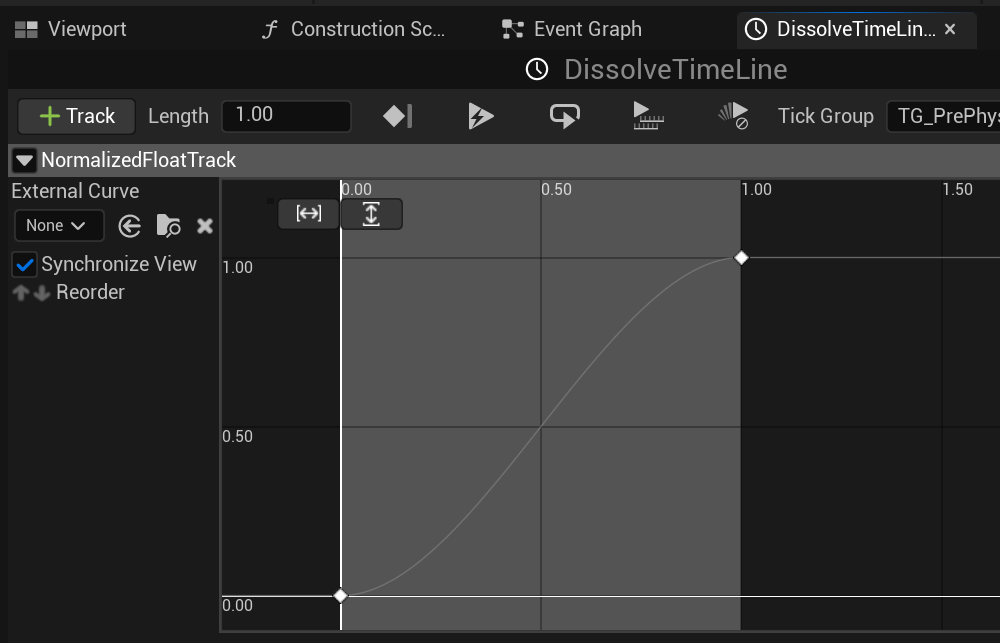
在GA_Enemy_Death_Base的能力End之后执行OnEnemyDied函数。在敌人的角色蓝图中完成如下逻辑:
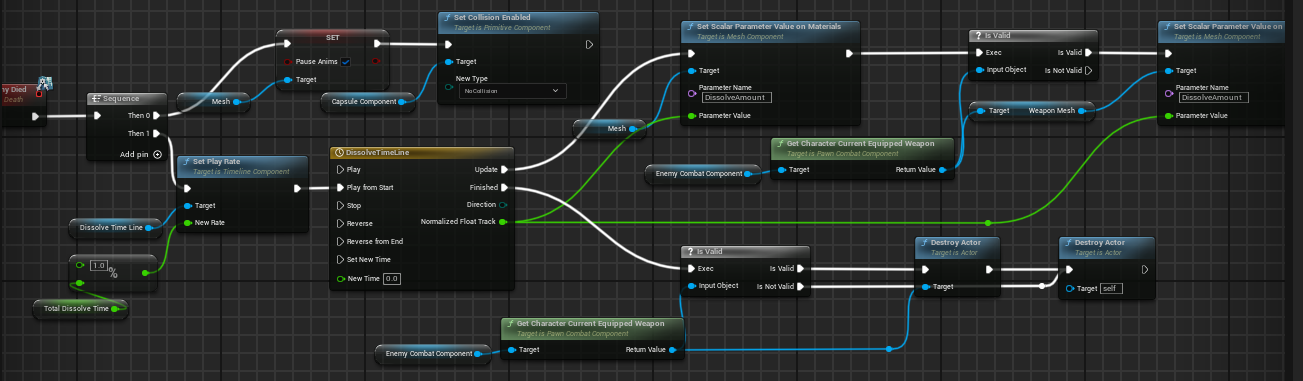
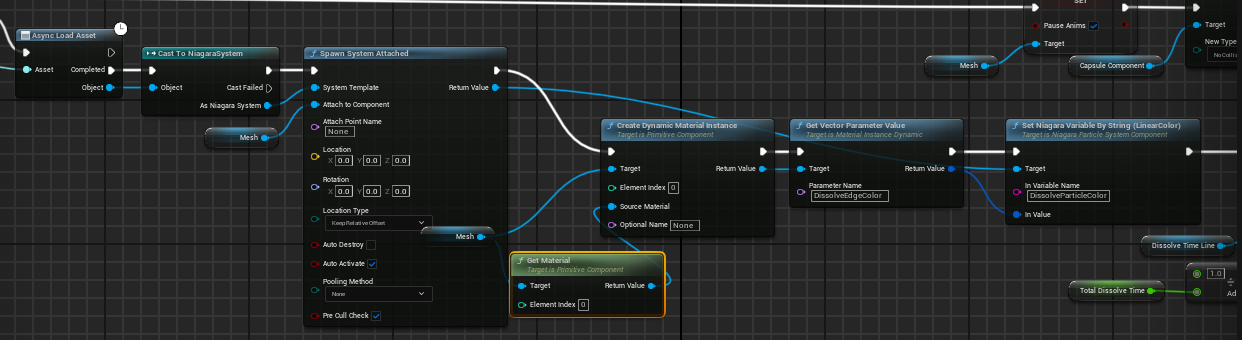
在OnEnemyDied函数中添加NiagaraSystem软引用对象的输入,可以在子类GA中配置粒子特效。
死亡的Nagara粒子特效,
UI
属性变换会通知PawnUIComponent,然后去做广播。
而Widgets会监听并做更新。
首先创建几个Cpp文件:
PawnUIInterface(获取UI组件,需要被添加到角色基类)
PawnUIComponent
|__HeroUIComponent
|__EnemyUIComponent
角色基类中与子类都要去实现该函数:
// ~ Begin IPawnUIInterface Interface
virtual UPawnUIComponent* GetPawnUIComponent() const override;
// ~ End IPawnUIInterface Interface
为了获得Hero中独特的Rage属性,IPawnUIInterface和Hero中需要额外实现一个函数。
virtual UHeroUIComponent* GetHeroUIComponent() const override;
定义多播委托:
DECLARE_DYNAMIC_MULTICAST_DELEGATE_OneParam(FOnPercentChangeDelegate, float, NewPercent);
UPROPERTY(BlueprintAssignable)
FOnPercentChangeDelegate OnCurrentHealthChanged;
HeroUIComponent中额外有一个rage:
UPROPERTY(BlueprintAssignable)
FOnPercentChangeDelegate OnCurrentRageChanged;
因此在WarriorAttributeSet中的PostGameplayEffectExecute可以添加委托的广播了
if (!CachedPawnUIInterface.IsValid())
{
    CachedPawnUIInterface = TWeakInterfacePtr<IPawnUIInterface>(Data.Target.GetAvatarActor());
}
UPawnUIComponent* PawnUIComponent = CachedPawnUIInterface->GetPawnUIComponent();
// ...
PawnUIComponent->OnCurrentHealthChanged.Broadcast(GetCurrentHealth() / GetMaxHealth());
if (UHeroUIComponent* HeroUIComponent = CachedPawnUIInterface->GetHeroUIComponent())
{
    HeroUIComponent->OnCurrentRageChanged.Broadcast(GetCurrentRage() / GetMaxRage());
}
创建一个新的cpp文件——WarriorWidgetBase
在该类中重写NativeOnInitialized写调用蓝图的函数和敌人创建UI初始化的函数。
UFUNCTION(BlueprintImplementableEvent, meta = (DisplayName = "On Owning Hero UI Comonent Initialized"))
void BP_OnOwningHeroUIComponentInitialized(UHeroUIComponent* OwningHeroUIComponent);

UFUNCTION(BlueprintImplementableEvent, meta = (DisplayName = "On Owning Enemy UI Comonent Initialized"))
void BP_OnOwningEnemyUIComponentInitialized(UEnemyUIComponent* OwningEnemyUIComponent);

void UWarriorWidgetBase::NativeOnInitialized()
{
    Super::NativeOnInitialized();
    if (IPawnUIInterface* PawnUIInterface = Cast<IPawnUIInterface>(GetOwningPlayerPawn()))
    {
       if (UHeroUIComponent* HeroUIComponent = Cast<UHeroUIComponent>(PawnUIInterface->GetHeroUIComponent()))
       {
          BP_OnOwningHeroUIComponentInitialized(HeroUIComponent);
       }
    }
}
void UWarriorWidgetBase::InitEnemyCreatedWidget(AActor* OwningEnemyActor)
{
	if (IPawnUIInterface* PawnUIInterface = Cast<IPawnUIInterface>(OwningEnemyActor))
	{
		UEnemyUIComponent* EnemyUIComponent = PawnUIInterface->GetEnemyUIComponent();
		checkf(EnemyUIComponent, TEXT("Failed to extact an EnemyUIComponent from %s"), *OwningEnemyActor->GetActorNameOrLabel());
		BP_OnOwningEnemyUIComponentInitialized(EnemyUIComponent);
	}
}
UI部分不做过多阐述
创建一个继承SizeBox的蓝图WarriorSizeBox用于更改控件的大小和继承WarriorWidgetBase的TPWBP_IconSlot用于显示装配的武器和TPWBP_StatusBar用于显示玩家、敌人生命值和玩家怒气值。其中该控件根据不同比例来更改FillColor以实现生命值低于50为橙色进度条,低于20为红色进度条。
在敌人角色类中添加一个新组件EnemyHealthWidgetComponent挂载到骨骼下面,用于显示敌人血条。
添加角色新的GA——GA_Hero_DrawOverlayWidget,在初始时激活OnGiven规则,该能力无需tag,创建WBP_HeroOverlayWidget,在当中绑定属性改变的事件,Add to Viewport。
至此实现了玩家和敌人血条、怒气值的血条进度监听。
为了使武器图标能够显示当前装配的武器,我们需要在WeaponData中增加一个成员。
UPROPERTY(EditDefaultsOnly, BlueprintReadOnly)
TSoftObjectPtr<UTexture2D> SoftWeaponIconTexture;
在HeroUIComponent中添加一个委托。
DECLARE_DYNAMIC_MULTICAST_DELEGATE_OneParam(FOnEquippedWeaponChangedDelegate, TSoftObjectPtr<UTexture2D>, SoftWeaponIcon);
UPROPERTY(BlueprintCallable, BlueprintAssignable)
FOnEquippedWeaponChangedDelegate OnEquippedWeaponChanged;
然后在装配武器的GA中添加新逻辑,去CallOn这个委托。
之后在WBP_HeroOverlayWidget中绑定委托的触发事件:Set Soft Texture as Icon。
武器图标加载导致的问题
武器图标会闪一下,因为异步加载还未加载好的原因。因此删除Set Soft Texture as Icon这个函数。
原因是:当软引用有效时,会调用Set Brush from Soft Texture,但是这个过程会有一段时间,调用完这个函数会立刻执行Set Visbility,很有可能没加载好就直接Set Visbility了。
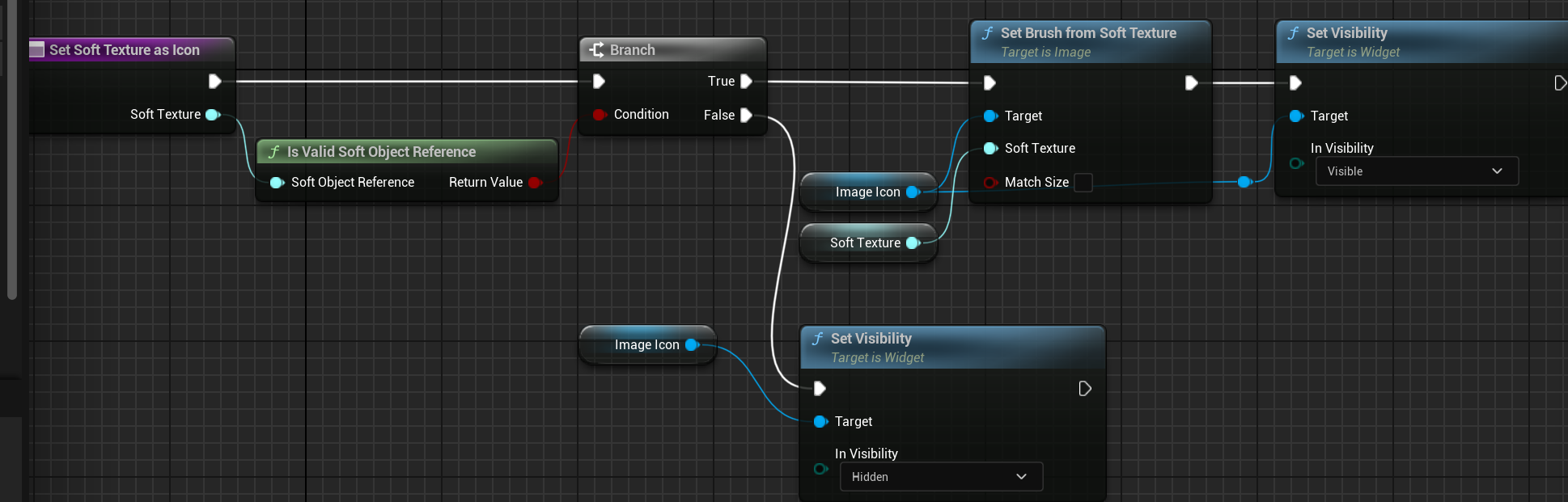
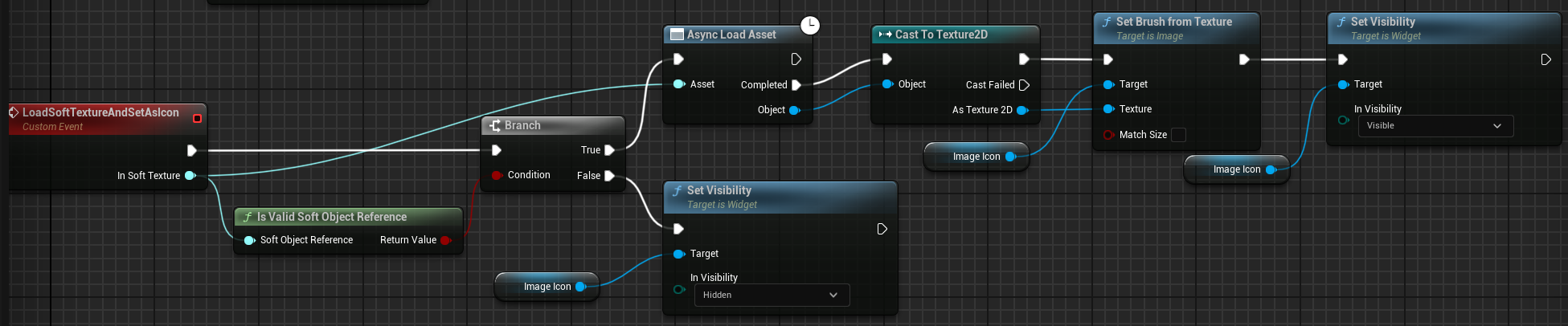
解决方法1:我们可以第一次加载时先手动加载。
解决方法2:可以延迟调用Set Visibility
我们采用第一种方式:
Sharing is caring!