GAS项目笔记4
Dec 7, 2025
33 mins read
UE避障算法
在虚幻引擎寻路系统中使用避障机制 | 虚幻引擎 5.7 文档 | Epic Developer Community
相对速度障碍物算法(RVO)
核心思想:用当前速度、位置和相对速度预测碰撞,然后实时调整速度,避免与其他个体发生碰撞。它只负责即时的动作决策,不规划路径,也不管理群体。
输入:当前速度 + 相对位置 + 预测碰撞时间
输出:一个新的安全速度向量
群组绕行管理器(Detour Crowd Manager)
核心思想:基于NavMesh进行全局路径规划,再结合局部避障(内部可能使用RVO),对大量智能体进行统一管理,比如寻路、速度匹配、优先级控制、群体移动等。
AI避让
AWarriorAIController 自定义AIController
|——AIC_Enemy_Base
|——AIC_Guardian
AIController 构造时,会自动创建一个 PathFollowingComponent,用于寻路和路径跟随。但这个默认组件不支持群组避障。
因此需要把默认创建的PathFollowingComponent替换为UCrowdFollowingComponent
SetDefaultSubobjectClass<UCrowdFollowingComponent>("PathFollowingComponent")
AWarriorAIController(const FObjectInitializer& ObjectInitializer);
AWarriorAIController::AWarriorAIController(const FObjectInitializer& ObjectInitializer)
	: Super(ObjectInitializer.SetDefaultSubobjectClass<UCrowdFollowingComponent>("PathFollowingComponent"))
{
	if (UCrowdFollowingComponent* CrowdComp = Cast<UCrowdFollowingComponent>(GetPathFollowingComponent()))
	{
		Debug::Print(TEXT("CrowdFollowingComponent valid"));
	}
}
将AIC_Guardian绑到BP_Gruntiling_Guardian上。
之后在当中创建UAISenseConfig_Sight和UAIPerceptionComponent,进行一些默认值设置和将视觉绑定到感知上。
并且绑定委托用于当小怪看到人之后做一些事情。
AISenseConfig_Sight = CreateDefaultSubobject<UAISenseConfig_Sight>(TEXT("EnemySenseConfig_Sight"));
AISenseConfig_Sight->DetectionByAffiliation.bDetectEnemies = true;
AISenseConfig_Sight->DetectionByAffiliation.bDetectFriendlies = false;
AISenseConfig_Sight->DetectionByAffiliation.bDetectNeutrals = false;
AISenseConfig_Sight->SightRadius = 5000.f;
AISenseConfig_Sight->LoseSightRadius = 0.f;
AISenseConfig_Sight->PeripheralVisionAngleDegrees = 360.f;
EnemyPerceptionComponent = CreateDefaultSubobject<UAIPerceptionComponent>(TEXT("EnemyPerceptionComponent"));
EnemyPerceptionComponent->ConfigureSense(*AISenseConfig_Sight);
EnemyPerceptionComponent->SetDominantSense(UAISenseConfig_Sight::StaticClass());
// 当视觉感知状态变化时执行 OnEnemyPerceptionUpdated
EnemyPerceptionComponent->OnTargetPerceptionUpdated.AddUniqueDynamic(this, &ThisClass::OnEnemyPerceptionUpdated);
现在设置完了对敌人感知,但是我们需要设置谁才是敌人。因此重写GetTeamAttitudeTowards,在其中获取检测的对象是否继承了IGenericTeamAgentInterface了接口(因此角色类需要继承这个接口),如果TeamId不一样,就是敌对的,否则是队友。
//~ Begin IGenericTeamAgentInterface Interface
virtual ETeamAttitude::Type GetTeamAttitudeTowards(const AActor& Other) const;
//~ End IGenericTeamAgentInterface Interface
ETeamAttitude::Type AWarriorAIController::GetTeamAttitudeTowards(const AActor& Other) const
{
	const APawn* PawnToCheck = Cast<const APawn>(&Other);
	const IGenericTeamAgentInterface* OtherTeamAgent = Cast<const IGenericTeamAgentInterface>(PawnToCheck->GetController());
	if (OtherTeamAgent && OtherTeamAgent->GetGenericTeamId() != GetGenericTeamId())
	{
		return ETeamAttitude::Hostile;
	}
	return ETeamAttitude::Friendly;
}
我们在构造函数中设置怪物的TeamId——SetGenericTeamId(FGenericTeamId(1));
同样在角色类继承IGenericTeamAgentInterface接口,创建FGenericTeamId HeroTeamId;并重写接口的GetGenericTeamId函数,返回这个HeroTeamId。
至此,敌人可以感知到玩家了。可以在OnEnemyPerceptionUpdated中写逻辑去让小怪看到玩家后做什么。
现在,我们需要让AI动起来,这样才可以实现避让的功能。所以添加黑板BB_EnemyBase和BT_Guardian行为树。他俩是关联的。为了测试就直接在AIC_Enemy_Base中Run Behavior Tree,在行为树中添加Move To节点,设置TargetActor黑板键,并在c++中的OnEnemyPerceptionUpdated去更新。
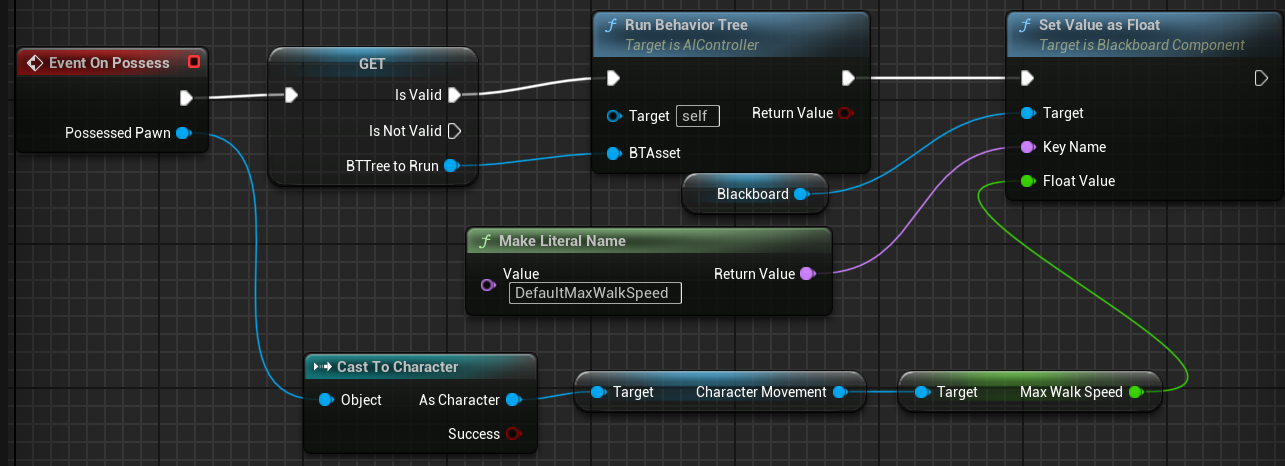
virtual void OnEnemyPerceptionUpdated(AActor* Actor, FAIStimulus Stimulus);
void AWarriorAIController::OnEnemyPerceptionUpdated(AActor* Actor, FAIStimulus Stimulus)
{
    if (Stimulus.WasSuccessfullySensed() && Actor)
    {
       if (UBlackboardComponent* BlackboardComponent = GetBlackboardComponent())
       {
          BlackboardComponent->SetValueAsObject(FName("TargetActor"), Actor);
       }
    }
}
之后在BeginPlay中设置避让算法的参数:是否启用、质量、避让哪组、碰撞查询范围等。
private:
	UPROPERTY(EditDefaultsOnly, Category = "Detour Crowd Avoidance Config")
	bool bEnableDetourCrowdAvoidance = true;

	UPROPERTY(EditDefaultsOnly, Category = "Detour Crowd Avoidance Config", meta = (EditCondition = "bEnableDetourCrowdAvoidance", UIMin = "1", UIMax = "4"))
	int32 DetourCrowdAvoidanceQuality = 4;

	UPROPERTY(EditDefaultsOnly, Category = "Detour Crowd Avoidance Config", meta = (EditCondition = "bEnableDetourCrowdAvoidance"))
	float CollisionQueryRange = 600.f;

void AWarriorAIController::BeginPlay()
{
    Super::BeginPlay();
    if (UCrowdFollowingComponent* CrowdComp = Cast<UCrowdFollowingComponent>(GetPathFollowingComponent()))
    {
       CrowdComp->SetCrowdSimulationState(bEnableDetourCrowdAvoidance ? ECrowdSimulationState::Enabled : ECrowdSimulationState::Disabled);
       switch (DetourCrowdAvoidanceQuality)
       {
       case 1: CrowdComp->SetCrowdAvoidanceQuality(ECrowdAvoidanceQuality::Low);   break;
       case 2: CrowdComp->SetCrowdAvoidanceQuality(ECrowdAvoidanceQuality::Medium); break;
       case 3: CrowdComp->SetCrowdAvoidanceQuality(ECrowdAvoidanceQuality::Good);  break;
       case 4: CrowdComp->SetCrowdAvoidanceQuality(ECrowdAvoidanceQuality::High);  break;
       default:
          break;
       }
       CrowdComp->SetAvoidanceGroup(1);
       CrowdComp->SetGroupsToAvoid(1);
       CrowdComp->SetCrowdCollisionQueryRange(CollisionQueryRange);
    }
}
但是这样虽然实现了两个人的避让,会出现一个问题:当有小怪时,第三个小怪会被卡住不能到玩家面前。
因此需要更改项目设置里的CrowdManager。虚幻引擎项目设置中的群组管理器设置 | 虚幻引擎 5.7 文档 | Epic Developer Community
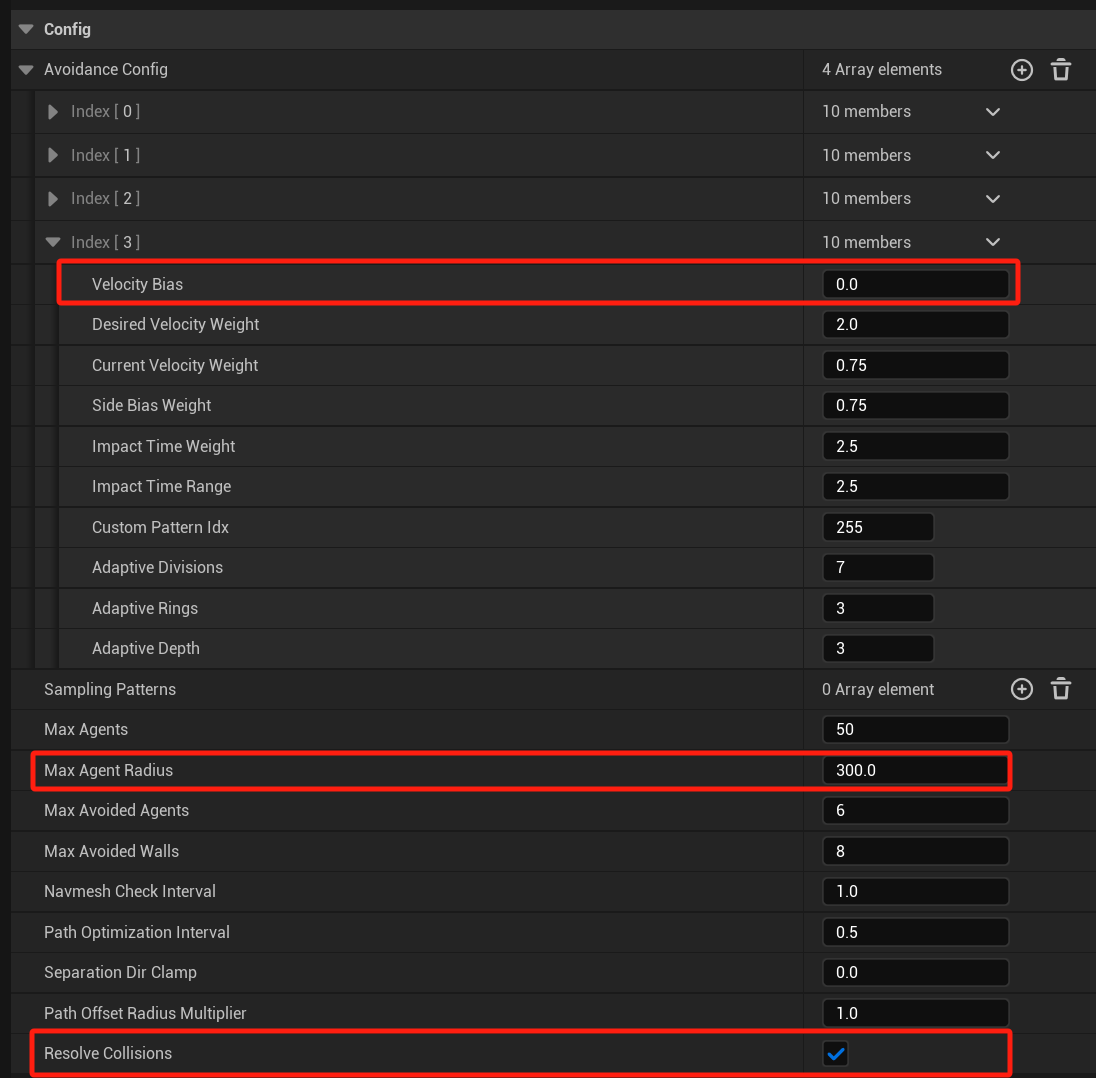
这样敌人就可以停在玩家面前,而不是一直卡在那里,但是仍然有问题:如果很多个敌人,难道要站在角色面前一列吗?
理想情况是敌人看到玩家之后,将玩家从不同方向围上来,而不是在玩家面前排排站。这是避让算法做不到的事情,我们需要在行为树中实现这个事情。
AI追踪
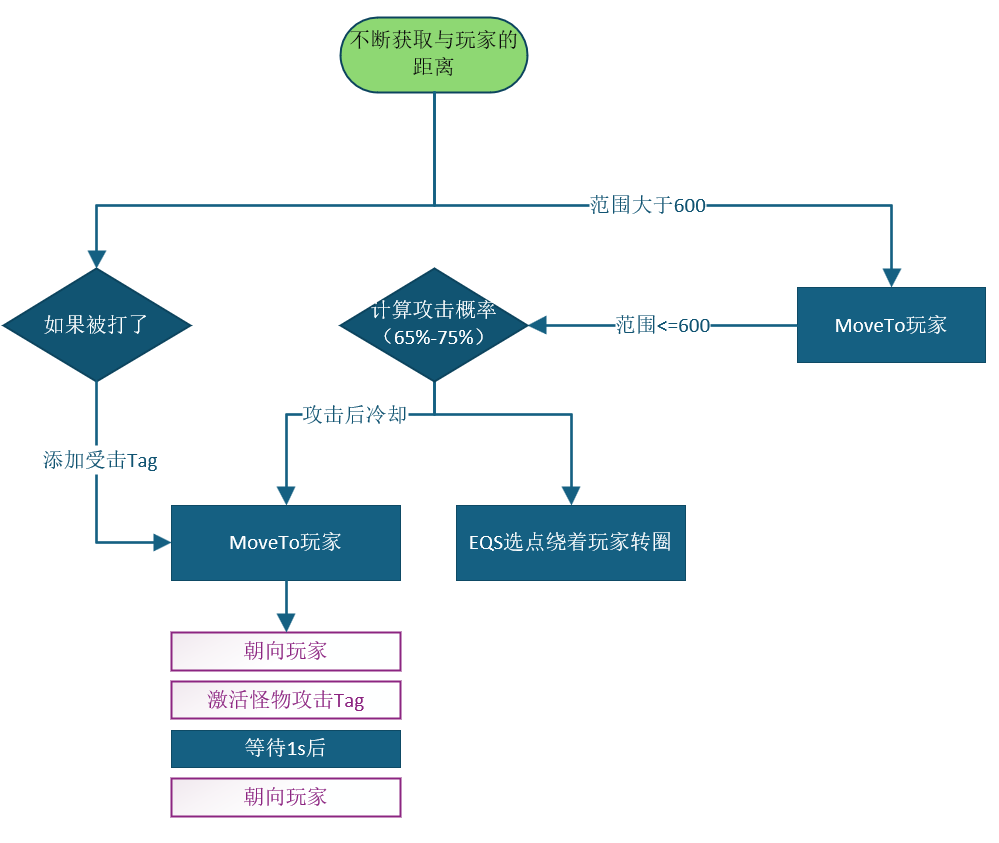
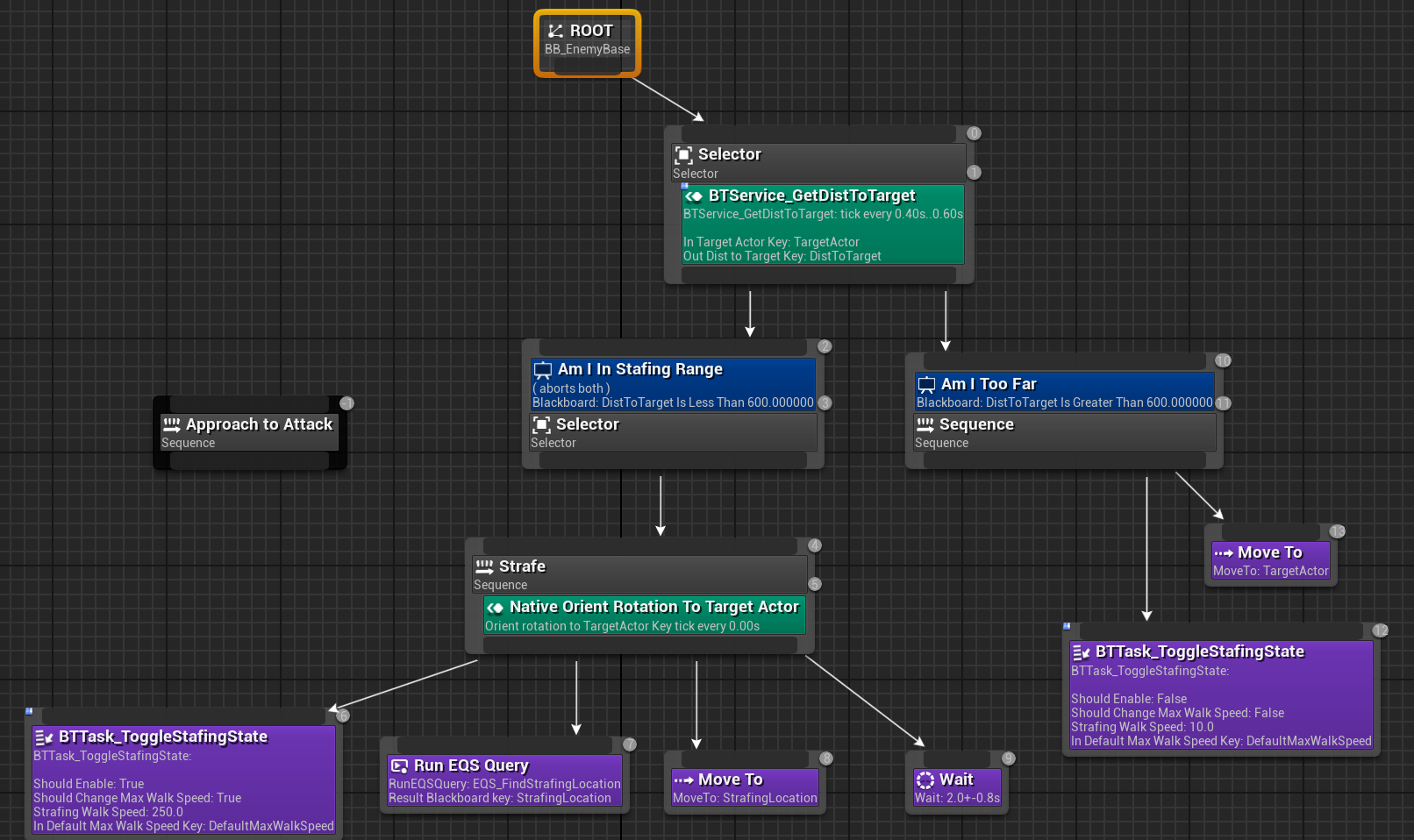
在Selector节点添加一个Service——BTService_GetDistToTarget,在其中Event Receive Tick AI每帧去获取AI和TargetActor的距离,返回一个float距离值并保存到黑板键的DisToTarget。获取的频率是0.2。
在Stafe也添加一个Service,在C++中创建的,继承自UBTService。
UBTService_OrientToTargetActor();

//~ Begin UBTNode Interface
virtual void InitializeFromAsset(UBehaviorTree& Asset) override;
virtual FString GetStaticDescription() const override;
//~ End UBTNode Interface

virtual void TickNode(UBehaviorTreeComponent& OwnerComp, uint8* NodeMemory, float DeltaSeconds) override;

UPROPERTY(EditAnywhere, Category = "Target")
FBlackboardKeySelector InTargetActorKey;

UPROPERTY(EditAnywhere, Category = "Target")
float RotationInterpSpeed;

UBTService_OrientToTargetActor::UBTService_OrientToTargetActor()
{
	NodeName = TEXT("Native Orient Rotation To Target Actor");
	INIT_SERVICE_NODE_NOTIFY_FLAGS(); // // UE 内部宏,启用 Tick / OnSearchStart 等回调
	RotationInterpSpeed = 5.f;
	Interval = 0.f;
	RandomDeviation = 0.f;
	// 声明这个 BlackboardKey 只能选择 Object 类型,且必须是 Actor 类型
	InTargetActorKey.AddObjectFilter(this, GET_MEMBER_NAME_CHECKED(ThisClass, InTargetActorKey), AActor::StaticClass());
}
void UBTService_OrientToTargetActor::InitializeFromAsset(UBehaviorTree& Asset)
{
	Super::InitializeFromAsset(Asset);
	if (UBlackboardData* BBAsset = GetBlackboardAsset())
	{
		// 把行为树里选择的黑板 Key 绑定过来
		InTargetActorKey.ResolveSelectedKey(*BBAsset);
	}
}
FString UBTService_OrientToTargetActor::GetStaticDescription() const
{
	const FString KeyDescription = InTargetActorKey.SelectedKeyName.ToString();
	return FString::Printf(TEXT("Orient rotation to %s Key %s"), *KeyDescription, *GetStaticServiceDescription());
}
void UBTService_OrientToTargetActor::TickNode(UBehaviorTreeComponent& OwnerComp, uint8* NodeMemory, float DeltaSeconds)
{
	Super::TickNode(OwnerComp, NodeMemory, DeltaSeconds);
	// 拿到目标对象和 AI 所控制的 Pawn
	UObject* ActorObject = OwnerComp.GetBlackboardComponent()->GetValueAsObject(InTargetActorKey.SelectedKeyName);
	AActor* TargetActor = Cast<AActor>(ActorObject);
	APawn* OwningPawn = OwnerComp.GetAIOwner()->GetPawn();
	if (OwningPawn && TargetActor)
	{
		// 计算我该朝向的角度
		const FRotator LookAtRot = UKismetMathLibrary::FindLookAtRotation(OwningPawn->GetActorLocation(), TargetActor->GetActorLocation());
		const FRotator TargetRot = FMath::RInterpTo(OwningPawn->GetActorRotation(), LookAtRot, DeltaSeconds, RotationInterpSpeed);
		OwningPawn->SetActorRotation(TargetRot); // 插值转向
	}
}
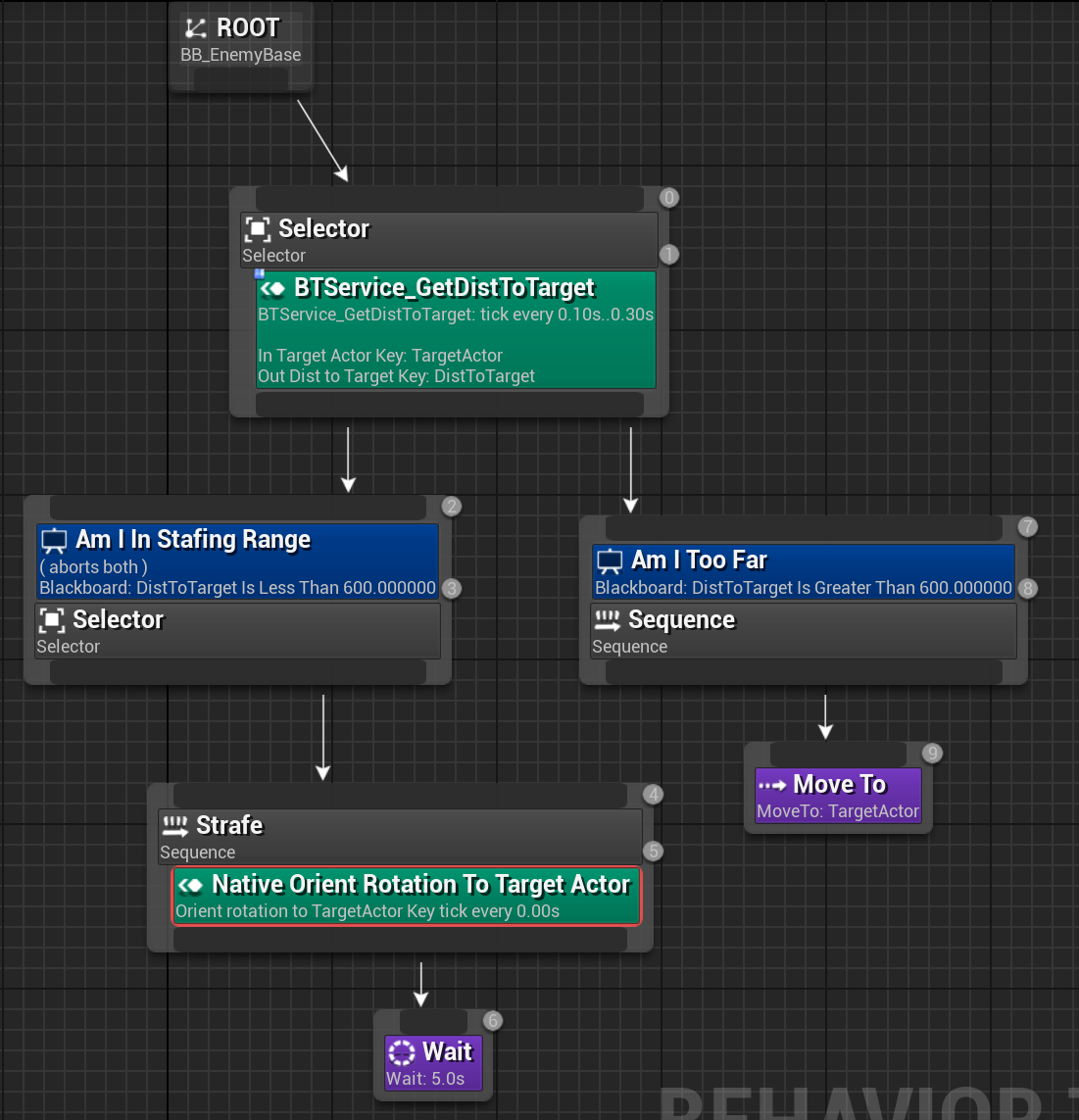
至此小怪可以实现在600距离之外会move to角色,小于600会注视玩家。并且会随着角色移动而旋转方向。
问题:重新启动UE发现Bug——导航网格失效。进入调试发现绿色的导航在天上。删除Recastnavmesh,之后BuildPath或者重启UE。
EQS怪物围绕玩家侧移
问题:当角色靠近墙壁时,EQS会查询到离玩家很近的点,导致小怪会非常贴近角色。
添加Tag——Enemy_Status_Strafing代表敌人侧移。在场景中添加EQS_TestPawn用于可视化EQS。
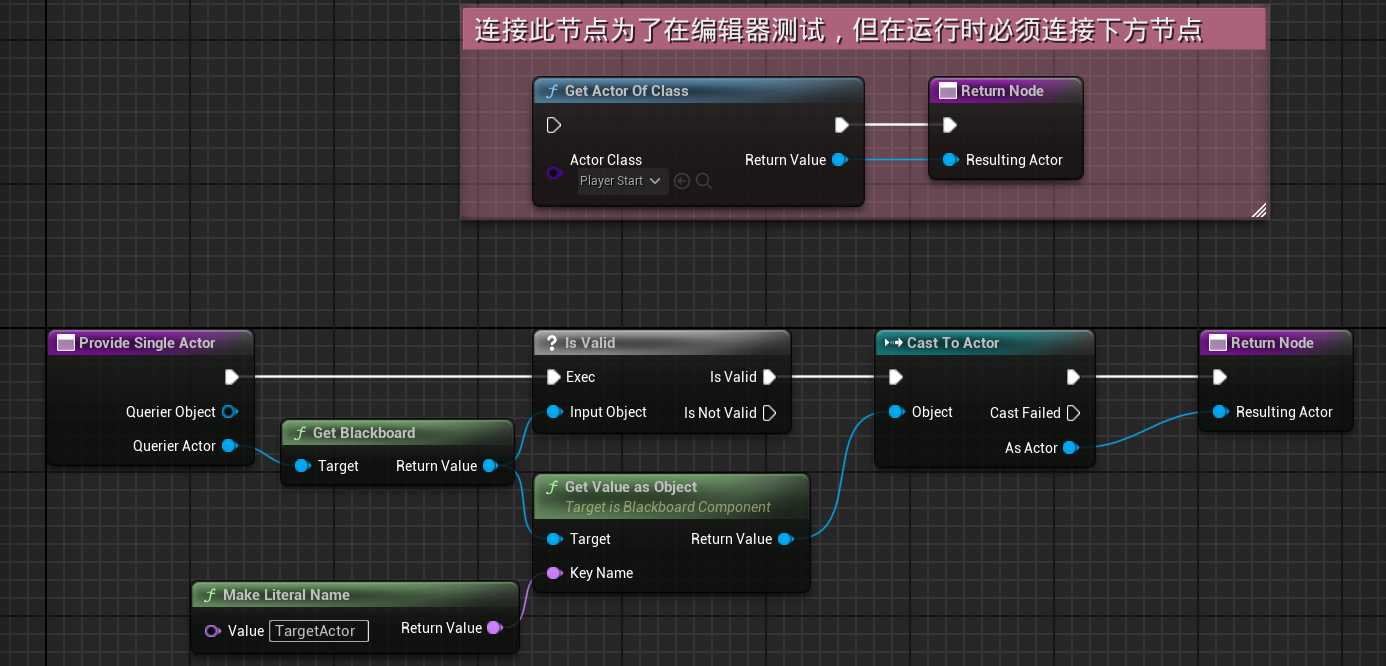
为了让小怪绕着角色侧移,需要创建一个继承Env Query Context Blueprint Base的EQS_Context_TargetActor。在其中获取黑板键的TargetActor也就是角色,然后返回角色的Actor。
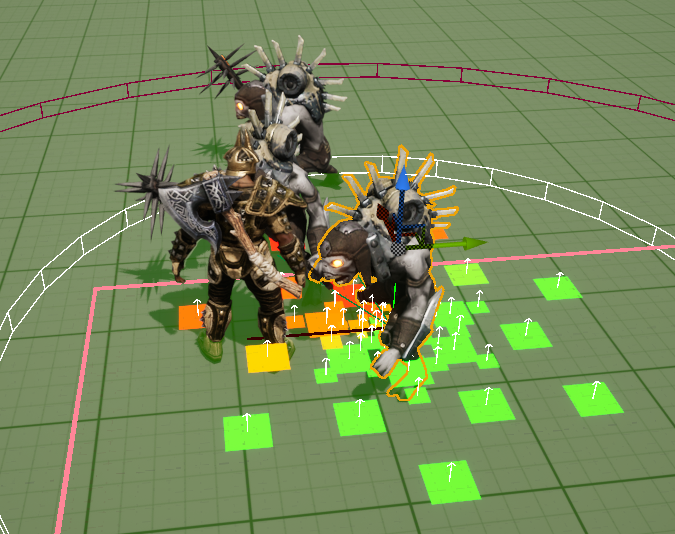
但是角色在编辑器中没有一个实体存在,存在的只有Player Start,因此如下图上方粉色区域,创建了一个能够可视化的测试节点。
之后创建一个EQS_FindStrafingLocation,生成器是圆形半径在480-650之间的范围,点12个,圆心是刚刚创建的EQS_Context_TargetActor。
之后添加一个PathFinding(Test类型,判断从查询点是否存在一条可行走的路径到指定目标)
再添加两个Distance,其中一个过滤类型是Range,范围在200-800之间;另一个是过滤掉与目标玩家的距离小于480的点,也就是必须要大于480的距离的点。
之后在行为树中执行这个EQS,将查询到的点赋值给黑板键StrafingLocation。
添加BTTask_EnemyBase用于敌人AI任务的基类,在其中添加逻辑执行Task。
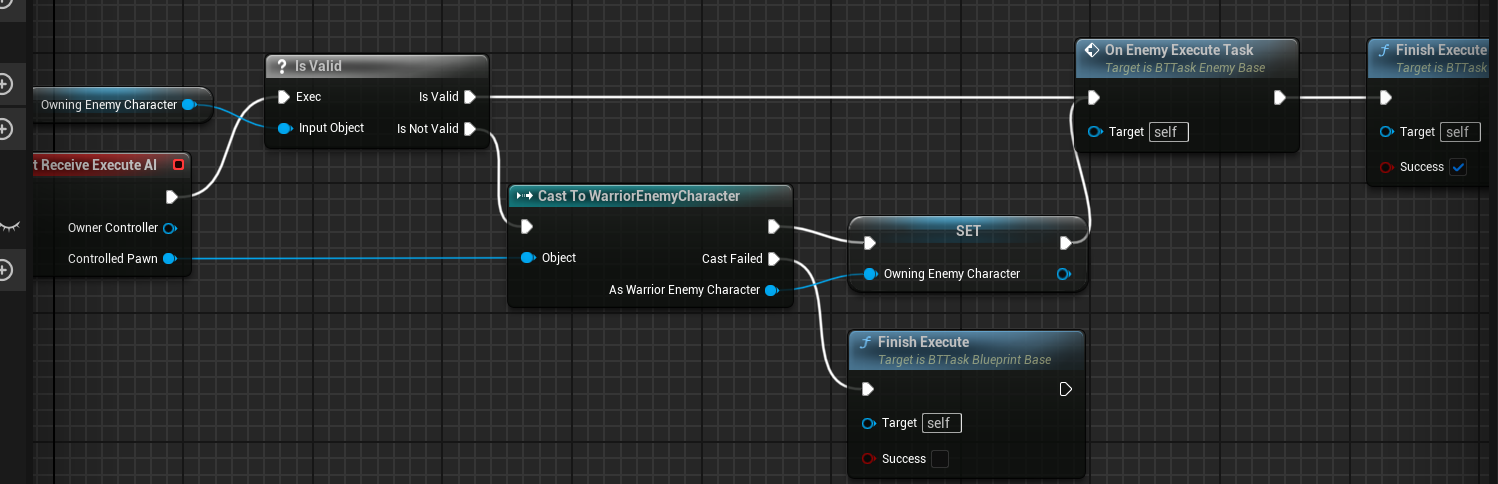
再创建BTTask_ToggleStafingState继承任务基类,在其中1.设置侧移时不跟随移动方向旋转 2.设置最大行走速度 3.添加GameplayTag。
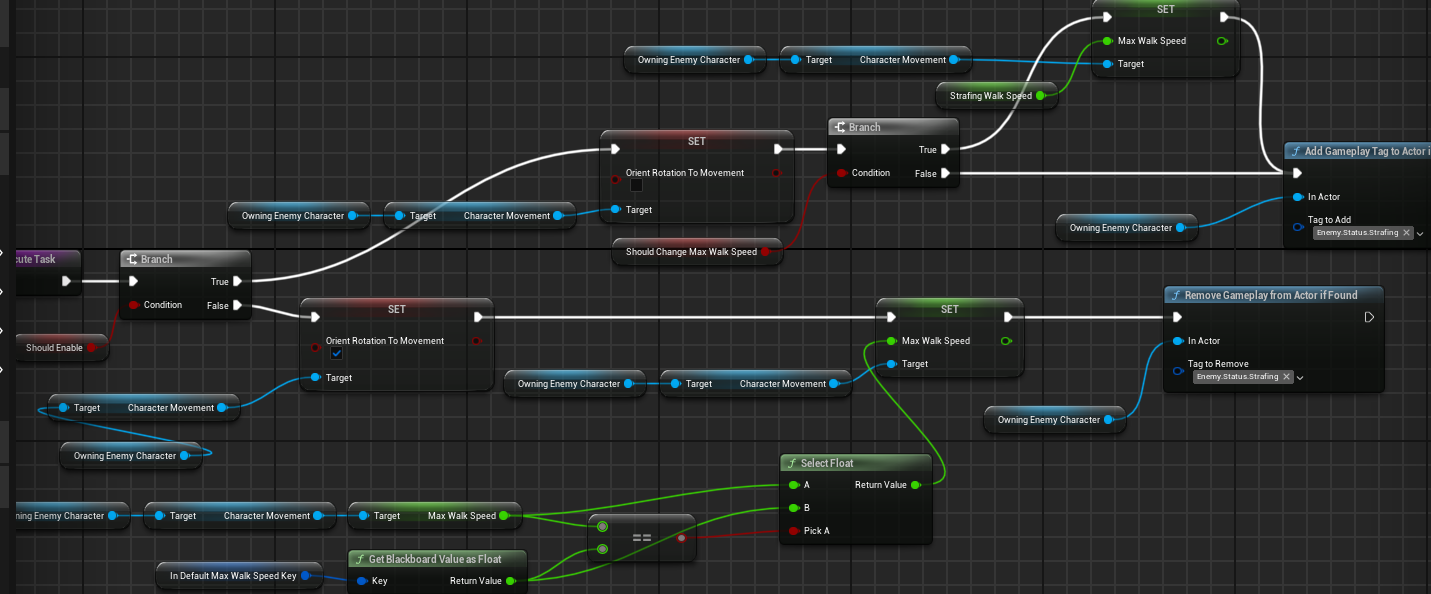
可以设置是否启用侧移,是否改变速度,如果改变的话速度是多少,并设置到黑板键中。
接下来需要制作小怪的侧移动画了,首先,我们需要知道侧移的方向是多少,所以在WarriorCharacterAnimInstance中声明一个新成员LocomotionDirection,通过UKismetAnimationLibrary去计算当前的方向。
LocomotionDirection = UKismetAnimationLibrary::CalculateDirection(OwningCharacter->GetVelocity(), OwningCharacter->GetActorRotation());
然后在父类WarriorBaseAnimInstance中添加一个角色敌人通用的函数,通过调用之前创建的自定义UWarriorFunctionLibrary库来判断当前角色是否存在Tag。
bool UWarriorBaseAnimInstance::DoesOwnerHaveTag(FGameplayTag TagToCheck) const
{
    if (APawn* OwningPawn = TryGetPawnOwner())
    {
       return UWarriorFunctionLibrary::NativeDoesActorHaveTag(OwningPawn, TagToCheck);
    }
    return false;
}
之后在ABP_EnemyBase中就可以通过是否有上面说到的Enemy_Status_Strafing来判断播放哪一个混合动画了。
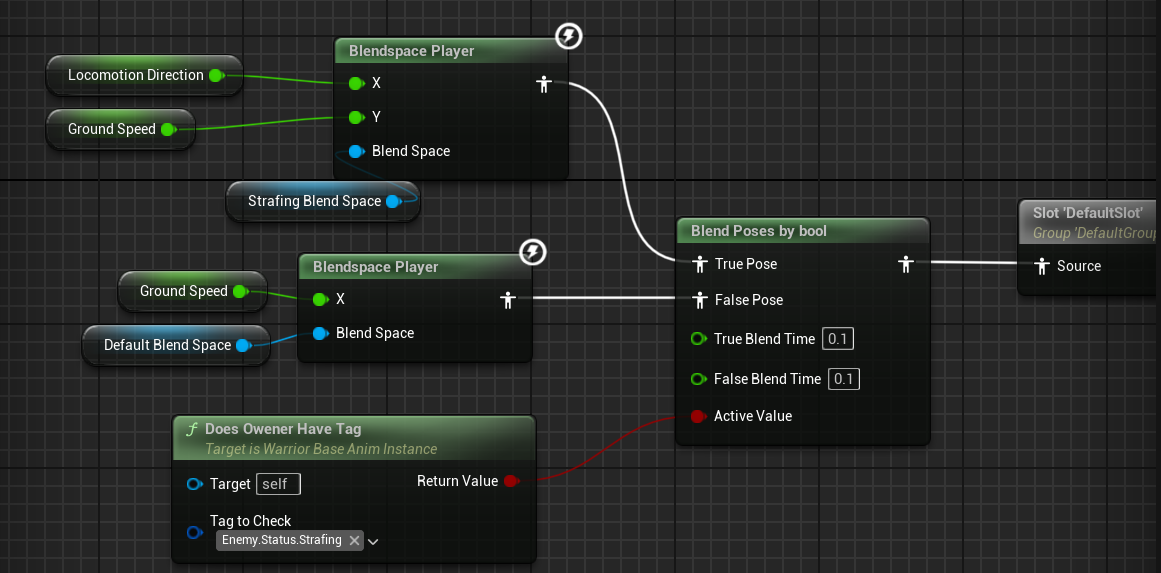
创建一个混合空间动画,水平轴是刚刚代码里获取的LocomotionDirection,纵轴是GroundSpeed,在其中添加小怪的动画。
至此完成小怪的侧移。
AI攻击能力
创建一个新的装饰器用于修饰小怪攻击的节点,想要实现的效果是:在小怪围着玩家侧移时,找到合适的机会接近玩家进行攻击。
因此在装饰其中通过Random Float in Range蓝图节点连接到Random Bool with Weight节点输出是否攻击。同时在行为树中添加一个冷却节点,防止小怪不停攻击。
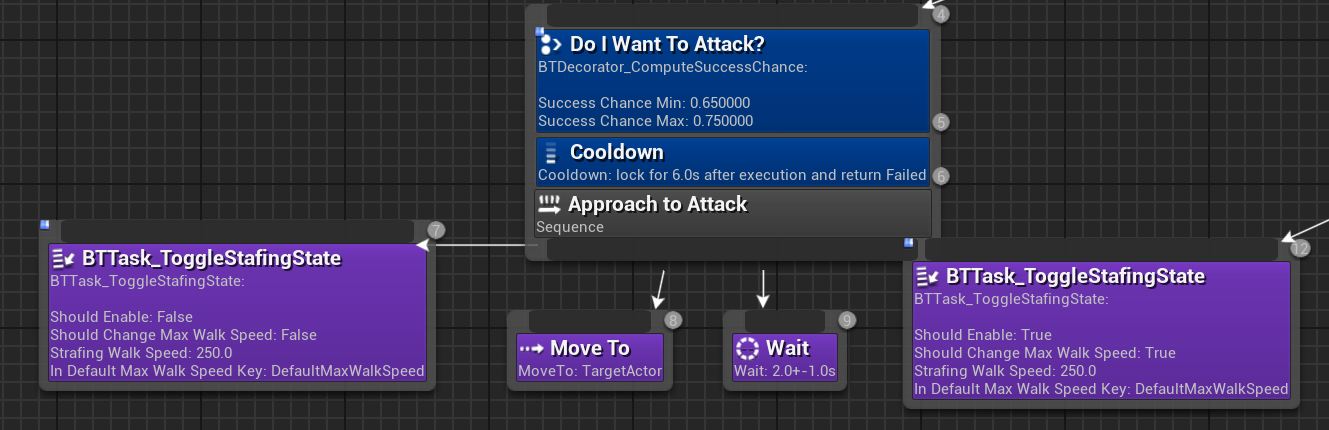
问题:小怪在接近玩家时攻击后(目前还没实现攻击),返回到侧移状态,可能会蹭着玩家移动到玩家背后的位置。
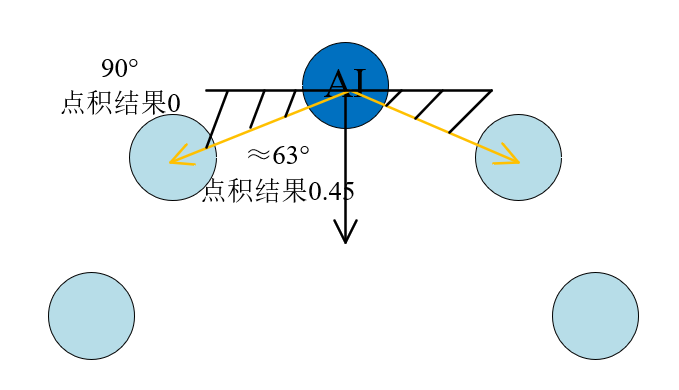
原因是小怪EQS得到的点有可能是它对面的点,玩家离它很近。因此需要将对面的几个点去除掉查询。通过点积结果来实现忽略掉一些点。
由于使用到点积计算了,因此可以屏蔽第一个Distance(200-800范围内的点)。
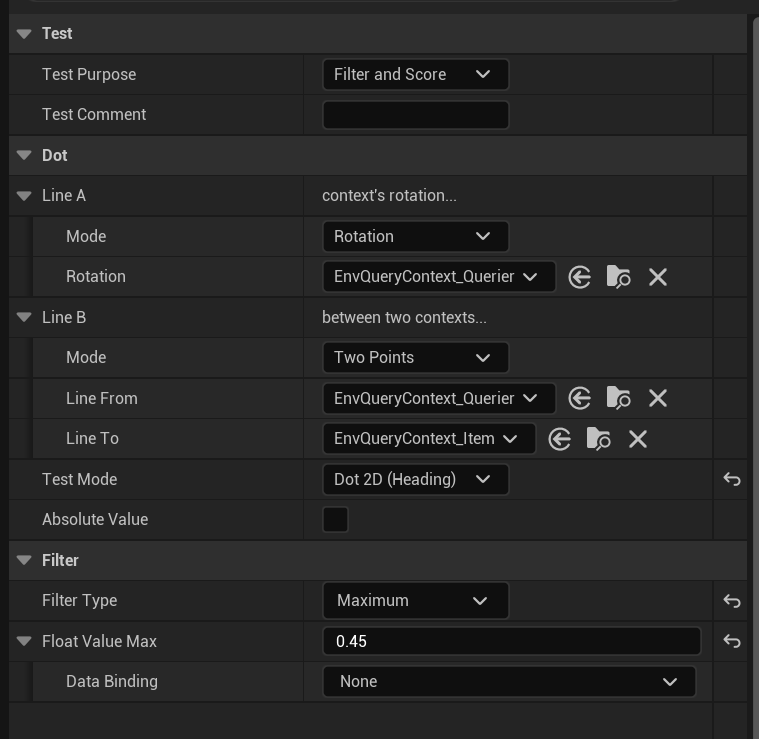
添加一个Dot2D,LineA是从执行EQS的AI的Forward方向发出,LineB是从执行EQS的AI至每个查询点的向量。
相同方向的点积(夹角0度)结果是1,垂直方向(夹角90度)是0。因此,设置为小于0.45的点,如下图黑色阴影区域为AI可侧移的点。
在/Shared/GameplayAbility文件夹中创建敌人攻击的GA基类GA_Enemy_MeleeAttack_Base。AbilityTags设置为Enemy.Ability.Melee。攻击时阻挡Enemy.Ability。InstancedPerActor。再次创建两个小怪攻击GA,GA_Guardian_Melee_1、GA_Guardian_Melee_2。
在WarriorAbilitySystemComponent中创建TryActivateAbilityByTag用于通过Tag激活能力。
bool UWarriorAbilitySystemComponent::TryActivateAbilityByTag(FGameplayTag AbilityTagToActivate)
{
    check(AbilityTagToActivate.IsValid());
    TArray<FGameplayAbilitySpec*> FoundAbilitySpec;
    GetActivatableGameplayAbilitySpecsByAllMatchingTags(AbilityTagToActivate.GetSingleTagContainer(), FoundAbilitySpec);
    if (!FoundAbilitySpec.IsEmpty())
    {
       const int32 RandomAbilityIndex = FMath::RandRange(0, FoundAbilitySpec.Num() - 1);
       FGameplayAbilitySpec* SpecToActivate = FoundAbilitySpec[RandomAbilityIndex];
       check(SpecToActivate);
       if (!SpecToActivate->IsActive())
       {
          return TryActivateAbility(SpecToActivate->Handle);
       }
    }
    return false;
}
比如说小怪有2个近战GA,他们的Tag都是基类Tag——Enemy.Ability.Melee。因此在该函数中会获取到这两个能力存储到FoundAbilitySpec数组中,然后随机抽取一个近战技能进行激活。
该函数会在行为树中的Task中被调用,创建一个BTTask_ActivateAbilityByTag用于在行为树中激活近战能力。
现在攻击能力可以被激活了,我们就该处理武器的碰撞检测和伤害机制了。
原先代码中的碰撞检测仅判断击中对象与武器拥有者是否同一个人,但是当敌人击中敌人了,是否要广播呢。答案是不能,因此需要判断击中的是否为敌人关系。
void AWarriorWeaponBase::OnCollisionBoxBeginOverlap(UPrimitiveComponent* OverlappedComponent, AActor* OtherActor,
                                                    UPrimitiveComponent* OtherComp, int32 OtherBodyIndex, bool bFromSweep, const FHitResult& SweepResult)
{
	APawn* WeaponOwningPawn = GetInstigator<APawn>();
	checkf(WeaponOwningPawn, TEXT("Forget to assign an instigator as the owning pawn of the weapon: %s"), *GetName());
	if (APawn* HitPawn = Cast<APawn>(OtherActor))
	{
		if (WeaponOwningPawn != HitPawn)
		{
			OnWeaponHitTarget.ExecuteIfBound(OtherActor);
		}
	}
}
因此在WarriorFunctionLibrary创建IsTargetPawnHostile函数来判断是否为同队。
bool UWarriorFunctionLibrary::IsTargetPawnHostile(APawn* QueryPawn, APawn* TargetPawn)
{
    check(QueryPawn && TargetPawn);
    IGenericTeamAgentInterface* QueryTeamAgent = Cast<IGenericTeamAgentInterface>(QueryPawn->GetController());
    IGenericTeamAgentInterface* TargetTeamAgent = Cast<IGenericTeamAgentInterface>(TargetPawn->GetController());
    if (QueryTeamAgent && TargetTeamAgent)
    {
       return QueryTeamAgent->GetGenericTeamId() != TargetTeamAgent->GetGenericTeamId();
    }
    return false;
}
之后更改WarriorWeaponBase中的代码,这样不论是AI还是玩家都可以碰撞检测了。当然一定要记得在小怪攻击的蒙太奇动画中添加之前已经制作过的AnimNotifyState——ANS_ToggleWeaponCollision。
void AWarriorWeaponBase::OnCollisionBoxBeginOverlap(UPrimitiveComponent* OverlappedComponent, AActor* OtherActor,
                                                    UPrimitiveComponent* OtherComp, int32 OtherBodyIndex, bool bFromSweep, const FHitResult& SweepResult)
{
    APawn* WeaponOwningPawn = GetInstigator<APawn>();
    checkf(WeaponOwningPawn, TEXT("Forget to assign an instigator as the owning pawn of the weapon: %s"), *GetName());

    if (APawn* HitPawn = Cast<APawn>(OtherActor))
    {
       if (UWarriorFunctionLibrary::IsTargetPawnHostile(WeaponOwningPawn, HitPawn))
       {
          OnWeaponHitTarget.ExecuteIfBound(OtherActor);
       }
    }
}
void AWarriorWeaponBase::OnCollisionBoxEndOverlap(UPrimitiveComponent* OverlappedComponent, AActor* OtherActor,
                                                  UPrimitiveComponent* OtherComp, int32 OtherBodyIndex)
{
    APawn* WeaponOwningPawn = GetInstigator<APawn>();
    checkf(WeaponOwningPawn, TEXT("Forget to assign an instigator as the owning pawn of the weapon: %s"), *GetName());
    if (APawn* HitPawn = Cast<APawn>(OtherActor))
    {
       if (UWarriorFunctionLibrary::IsTargetPawnHostile(WeaponOwningPawn, HitPawn))
       {
          OnWeaponPulledFromTarget.ExecuteIfBound(OtherActor);
       }
    }
}
然后在EnemyCombatComponent中重写OnHitTargetActor,可以处理攻击到玩家后小怪做一些什么事情。
目前先有一个大概的框架:当玩家格挡小怪攻击时,攻击无效;或者小怪可以无视玩家的格挡,攻击有效。如果有效则会SendGameplayEventToActor。这样在小怪的近战攻击GA中可以Wait Gameplay Event再去执行伤害之类的逻辑。
UAbilitySystemBlueprintLibrary::SendGameplayEventToActor(
    GetOwningPawn(),
    WarriorGameplayTags::Shared_Event_MeleeHit,
    EventData
);
为了让敌人也能造成伤害,和玩家一样写一个MakeEnemyDamageEffectSpecHandle函数用于创建敌人伤害的GE句柄。
FGameplayEffectSpecHandle UWarriorEnemyGameplayAbility::MakeEnemyDamageEffectSpecHandle(
    TSubclassOf<UGameplayEffect> EffectClass, const FScalableFloat& InDamageScalableFloat)
{
    check(EffectClass);
    FGameplayEffectContextHandle ContextHandle = GetWarriorAbilitySystemComponentFromActorInfo()->MakeEffectContext();
    ContextHandle.SetAbility(this);
    ContextHandle.AddSourceObject(GetAvatarActorFromActorInfo());
    ContextHandle.AddInstigator(GetAvatarActorFromActorInfo(), GetAvatarActorFromActorInfo());

    FGameplayEffectSpecHandle EffectSpecHandle = GetWarriorAbilitySystemComponentFromActorInfo()->MakeOutgoingSpec(
       EffectClass,
       GetAbilityLevel(),
       ContextHandle
    );
    EffectSpecHandle.Data->SetSetByCallerMagnitude(
       WarriorGameplayTags::Shared_SetByCaller_BaseDamage,
       InDamageScalableFloat.GetValueAtLevel(GetAbilityLevel())
    );
    return EffectSpecHandle;
}
再GA近战中调用该函数,传入GE_Shared_DealDamage也就是自定义计算类,之后就可以调用BP_ApplyEffectSpecHandleToTarget执行伤害了。
但是AI攻击还存在一个问题,播放攻击的蒙太奇动画时,如果玩家走到它背后,AI仍然在原地攻击,并没有转向。为此我们要添加运动扭曲
UPROPERTY(VisibleAnywhere, BlueprintReadOnly, Category = "MotionWarping")
UMotionWarpingComponent* MotionWarpingComponent;
MotionWarpingComponent = CreateDefaultSubobject<UMotionWarpingComponent>(TEXT("MotionWarpingComponent"));
这样我们就可以在蒙太奇动画中添加动画通知,来设置它的
1.倾斜扭曲(Skew Warp)扭曲游戏对象的根骨骼运动,使其匹配关卡中扭曲窗口末尾的动画位置和旋转。
2.扭曲目标名称(Warp Target Name):用于查找此扭曲目标的名称。关联到 Add or Update Warp Target Point 蓝图节点。
3.扭曲平移(Warp Translation):是否扭曲根骨骼运动的平移组件。
4.旋转类型(Rotation Type):是否应扭曲旋转以匹配扭曲目标的旋转或面向扭曲目标。默认(Default) :角色旋转以匹配扭曲目标的旋转。 面向(Facing) :角色旋转以面向扭曲目标。
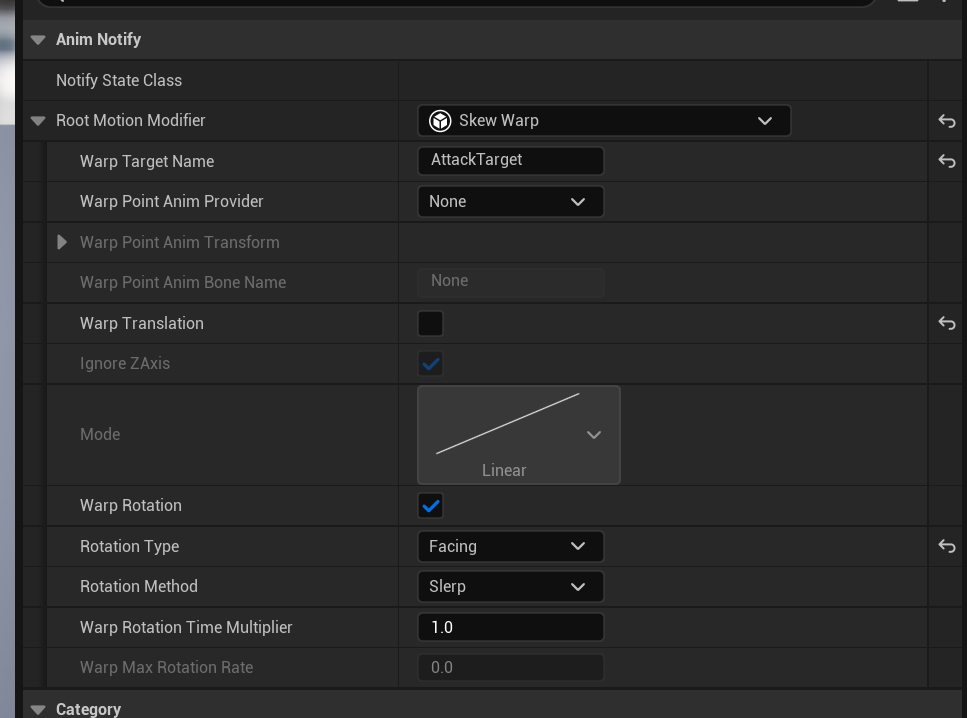
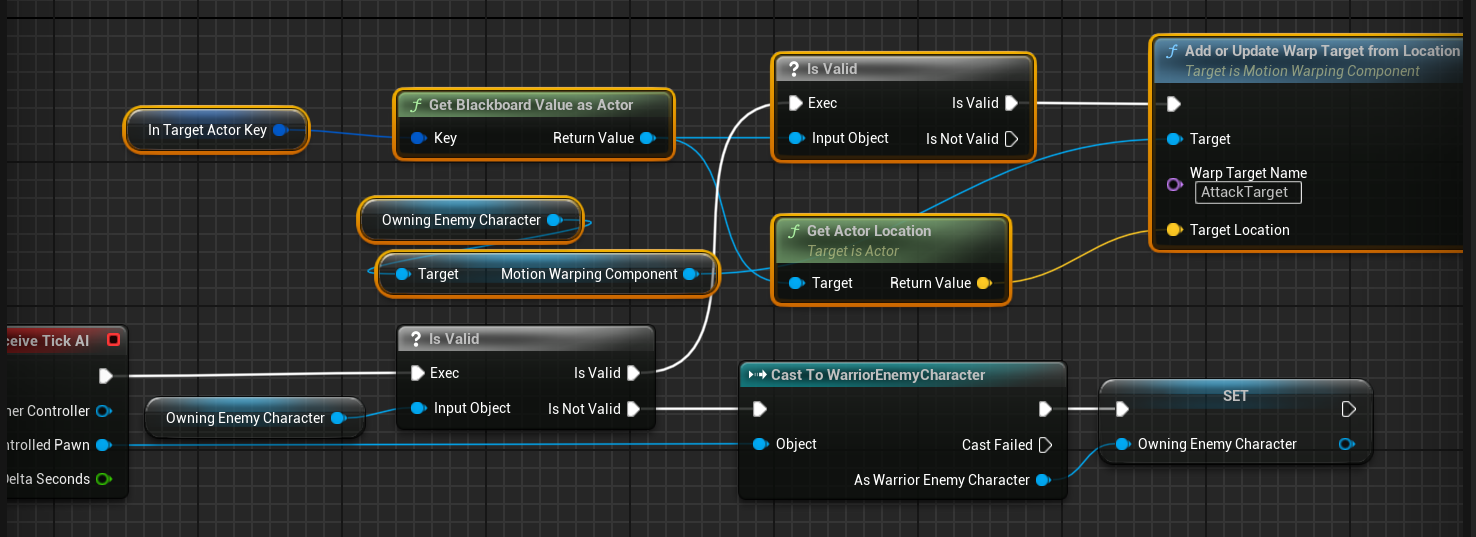
之后我们创建一个BTService_UpdateMotionWarpAttackTarget,在其中获取到AI拥有的MotionWarpingComponent,然后去调用Add or Update Warp Target Point节点,并关联扭曲目标名称。
但是即使添加完运动扭曲后,仍然存在问题,小怪还没有旋转到角色面前就开始攻击,一下子在攻击的时候转向玩家。显得很突兀,因此我们需要编写自定义Task。
为什么不用原生的Rotate to face BB entry呢,因为我们之前将怪物AI设置为不能控制器控制旋转。所以该节点无效。
UBTTask_RotateToFaceTarget::UBTTask_RotateToFaceTarget()
{
    NodeName = TEXT("Native Rotate to Face Target Actor");
    AnglePrecision = 10.f;
    RotationInterpSpeed = 5.f;
    bNotifyTick = true;
    bNotifyTaskFinished = true; // 使节点能收到任务结束的通知
    bCreateNodeInstance = false; // 不是为每个实例创建独立的UObject实例

    INIT_TASK_NODE_NOTIFY_FLAGS(); // 初始化通知标志
    // 给黑板 key 添加过滤器,仅允许选择 AActor 类型
    InTargetToFaceKey.AddObjectFilter(this, GET_MEMBER_NAME_CHECKED(ThisClass, InTargetToFaceKey), AActor::StaticClass());
}

void UBTTask_RotateToFaceTarget::InitializeFromAsset(UBehaviorTree& Asset)
{
    Super::InitializeFromAsset(Asset);
    if (UBlackboardData* BBAsset = GetBlackboardAsset())
    {
       InTargetToFaceKey.ResolveSelectedKey(*BBAsset);
    }
}

// 返回内存大小
uint16 UBTTask_RotateToFaceTarget::GetInstanceMemorySize() const
{
    return sizeof(FRotateToFaceTargetTaskMemory);
}

// 节点描述
FString UBTTask_RotateToFaceTarget::GetStaticDescription() const
{
    const FString KeyDescription = InTargetToFaceKey.SelectedKeyName.ToString();
    return FString::Printf(TEXT("Rotate to face %s Key until the angle precision: %s is reached"), *KeyDescription, *FString::SanitizeFloat(AnglePrecision));
}

EBTNodeResult::Type UBTTask_RotateToFaceTarget::ExecuteTask(UBehaviorTreeComponent& OwnerComp, uint8* NodeMemory)
{
    UObject* ActorObject = OwnerComp.GetBlackboardComponent()->GetValueAsObject(InTargetToFaceKey.SelectedKeyName);
    AActor* TargetActor = Cast<AActor>(ActorObject);
    APawn* OwningPawn = OwnerComp.GetAIOwner()->GetPawn();
    FRotateToFaceTargetTaskMemory* Memory = CastInstanceNodeMemory<FRotateToFaceTargetTaskMemory>(NodeMemory);
    check(Memory);
    Memory->OwningPawn = OwningPawn;
    Memory->TargetActor = TargetActor;
    if (!Memory->IsValid())
    {
       return EBTNodeResult::Failed;
    }
    // 执行函数使其面向目标,之后清除内存
    if (HasReachedAnglePrecision(OwningPawn, TargetActor))
    {
       Memory->Reset();
       return EBTNodeResult::Succeeded;
    }
    // 任务还没完成 行为树会等待并每帧调用TickTask
    return EBTNodeResult::InProgress;
}

void UBTTask_RotateToFaceTarget::TickTask(UBehaviorTreeComponent& OwnerComp, uint8* NodeMemory, float DeltaSeconds)
{
    FRotateToFaceTargetTaskMemory* Memory = CastInstanceNodeMemory<FRotateToFaceTargetTaskMemory>(NodeMemory);
    // 如果Memory引用无效 任务失败 结束任务
    if (!Memory->IsValid())
    {
       FinishLatentTask(OwnerComp, EBTNodeResult::Failed);
    }
    // 达到角度 就清除内存 任务成功 结束任务
    if (HasReachedAnglePrecision(Memory->OwningPawn.Get(), Memory->TargetActor.Get()))
    {
       Memory->Reset();
       FinishLatentTask(OwnerComp, EBTNodeResult::Succeeded);
    }
    else // 插值平滑旋转
    {
       const FRotator LookAtRot = UKismetMathLibrary::FindLookAtRotation(Memory->OwningPawn->GetActorLocation(), Memory->TargetActor->GetActorLocation());
       const FRotator TargetRot = FMath::RInterpTo(Memory->OwningPawn->GetActorRotation(), LookAtRot, DeltaSeconds, RotationInterpSpeed);
       Memory->OwningPawn->SetActorRotation(TargetRot);
    }
}

// 计算当前朝向和 (TargetActor与OwnerPawn的向量) 夹角是否在旋转区间内
bool UBTTask_RotateToFaceTarget::HasReachedAnglePrecision(APawn* QueryPawn, AActor* TargetActor) const
{
    const FVector OwnerForward = QueryPawn->GetActorForwardVector();
    const FVector OwnerToTargetNormalized = (TargetActor->GetActorLocation() - QueryPawn->GetActorLocation()).GetSafeNormal();

    const float DotResult = FVector::DotProduct(OwnerForward, OwnerToTargetNormalized);
    const float AngleDiff = UKismetMathLibrary::DegAcos(DotResult);
    return AngleDiff <= AnglePrecision;
}
Sharing is caring!